Forum Discussion

SAHarch
Feb 18, 2020Copper Contributor
No menu on Teams app
I would like to set up teams for our office, but right at the start up, there are no menus as is shown on all the videos and tutorials. What is going on here? Why do we only have a help section and n...
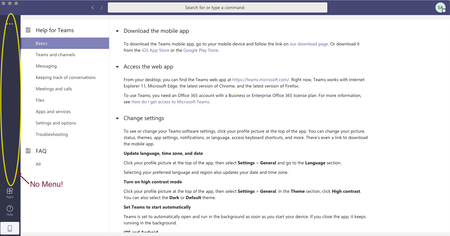

SAHarch
Feb 18, 2020Copper Contributor
To answer your other questions, yes, Teams is turned on in our Business 365 license. It allowed us to download it. I already tried signing in and out again. Yesterday it just crashed and wouldn't let me do anything. Not very convinced by this software!

Feb 18, 2020
I can imagine.
Ok, can you sign out of Teams and then turn off Teams on the licence and wait a period of time (I.e. 10 minutes), can you turn Teams back on and then sign in again. Let me know how that goes.
If there is still an issue at this point, and it's impacting the desktop and web client experience then the solution would be to open a ticket to support as soon as possible with screenshots to get help to fix this. As it's impacting both desktop and web then it sounds like something is up on the back end
Best, Chris
Ok, can you sign out of Teams and then turn off Teams on the licence and wait a period of time (I.e. 10 minutes), can you turn Teams back on and then sign in again. Let me know how that goes.
If there is still an issue at this point, and it's impacting the desktop and web client experience then the solution would be to open a ticket to support as soon as possible with screenshots to get help to fix this. As it's impacting both desktop and web then it sounds like something is up on the back end
Best, Chris
- SAHarchFeb 18, 2020Copper Contributor
Thanks again for your help. I shut it down and tried again. Still no luck. Just error messages. I'll open a ticket.
 JasonLeach_OpMoDec 19, 2021Copper ContributorDid you ever get a solution for this issue? I have the exact same problem, although I have a trouble ticket submitted, I'm wondering what your solution was. Thanks.