Forum Discussion

Missing presence status in Outlook
 Oct 16, 2020
You have to register Teams as your default chat app for Office, this can be done in Teams:
- click on your profile picture
- select settings
- in the section General you have to check the checkbox for Register Teams as chat app for Office
- it is applied automatically (no Ok button), you just have to restart your office applications

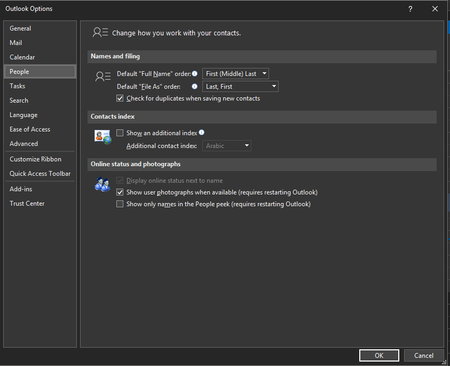
paul-lange as stated above. The Teams checkbox ("Register Teams as the chat app for Office") is enabled on all of the clients. But the weird thing is that the option in the outlook client app is greyed out. The registry is exactly the same:
[HKEY_CURRENT_USER\Software\IM Providers]
"DefaultIMApp"="Teams"
Is presence in general not shown in outlook or are you just missing the presence bubble next to the contact picture?
- ThomasSteiblApr 14, 2020Brass Contributor
paul-lange Click to chat is possible. Click to call is not, or I'm not able to do it.
We have not finished our hybrid setup yet.
What other presence information is there within outlook besides the presence bubble?