Forum Discussion

peter-wxin
May 08, 2020Tin Contributor
MicrosoftTeams PowerShell cmdlet doesn't work
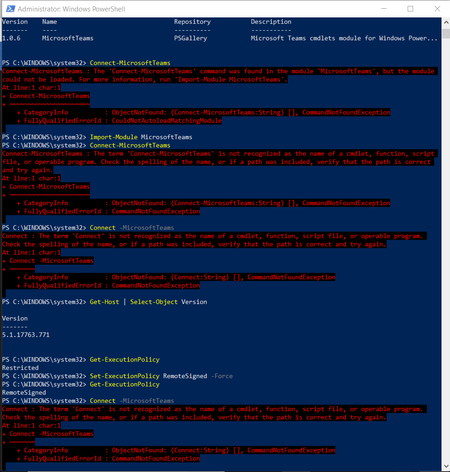
Excuse me, Microsoft Teams PowerShell cmdlet doesn't work. The error is: Connect-MicrosoftTeams : The term 'Connect-MicrosoftTeams' is not recognized as the name of a cmdlet, function, script ...
- Jan 07, 2021Finally, this post works for me.
https://infra.engineer/windows/63-powershell-error-message-warning-unable-to-resolve-package-source


Mitchell Bakker
May 08, 2020Steel Contributor
Hi Peter,
What is the version of PowerShell?
Can you validate that you are using PowerShell 5.1 or later?
What is the version of PowerShell?
Can you validate that you are using PowerShell 5.1 or later?
- peter-wxinMay 09, 2020Tin Contributor
Hi, Mitchell Bakker,
Thank you! I also contacted Office365 support and the agent show me the correct and updated command lines to run:
PS C:\WINDOWS\system32> $credentials=Get-Credential

cmdlet Get-Credential at command pipeline position 1
Supply values for the following parameters:
Credential
PS C:\WINDOWS\system32> Connect-MicrosoftTeams -Credential $credentials
Shame that Microsoft Teams PowerShell cmdlet documentation was not updated or friendly to a 1st-time/new user like me.
- Mitchell BakkerMay 09, 2020Steel ContributorSo, your problem is fixed now?
- AlanWaSep 03, 2020Copper Contributor
Hi Mitchell Bakker unfortunatley peter-wxin solution didnt worked for me. My Powershell version is 5.1.19041.1
After providing credentials and running the cmd "Connect-MicrosoftTeams -Credential $credentials" it's still throwing the same error.
Microsoft Teams cmdlets module version installed is 1.1.4Please help
Kind Regards
Alan

