Forum Discussion

Microsoft Teams Notification Sounds - Can't turn off???
 Jun 04, 2020
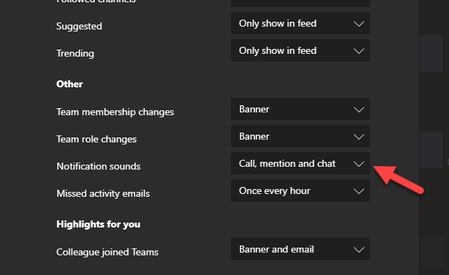
EricaMG this too was driving me nuts, I went into notifications and changed 'chat messages' from 'banner' to off.
This resolved my issue, I don't need to see every time there is a chat message, but if I'm mentioned or called it still alerts me.
I would prefer to keep the banner notification and simply eliminate the sound.

If this issue isn't resolved soon, I will be lobbying my organisation to change software.
Microsoft, do your job! Listen to your users! Issue an update with notification sound control NOW!!!!
Have a filter that will ding when you are @ in the conversation. That way it doesn't look like I'm intentionally ignoring everyone.
Or, have something that will allow the ding to stop if you can see the conversation but don't have the focus of the mouse on the Teams app.
Or, have something that will allow the ding to stop in a conversation except when you are @
Or, do anything to make the ding stop on a conversation that is constantly going. There is an email version which tells me when I have the Teams off and alerts me to new Teams messages. Could you please create a ding option where it only dings every 15 minutes or something?
I mean, at this point, it doesn't seem like Microsoft really cares about anything or anyone really. Just keep doing you I guess.
 ScriptBobNov 26, 2021Copper ContributorI solved it for me within the old Sound Part of the Control Panel.
Under "Sound Control Panel \ Sound \ Program Events", i cleared the Sound for these.
Windows:
- Notification
Skype for Business:
- Data Sharing Invitation
- Incoming IM
- New Message
Now i get a Sound for Calls, but nothing for Direct Messages or Group Chats. Alyssa_OConnellJan 07, 2022Copper Contributor
ScriptBob I am trying to figure this out using your steps below but cannot find the "program events" steps. The path I'm seeing is Control Panel - Hardware and Sound- Sound - Change System Sounds.....I dont see Microsoft Teams under this option. Not sure if I'm missing something
- ScriptBobJan 07, 2022Copper Contributor