Forum Discussion

Microsoft Places bug: Room images are too big, hiding info. Need a compact/resize option
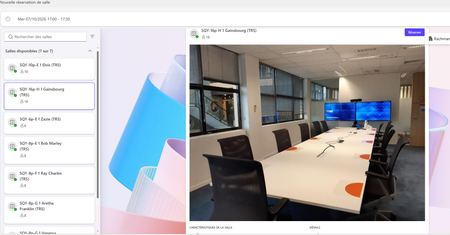

Your room photographs dominate the Places cards, pushing useful room details below the visible area, and reducing the source image dimensions has not changed the layout. That points to a presentation issue rather than proving the uploaded image itself is too large. Microsoft’s documented Set-PlaceV3 parameters manage place information; they do not expose a supported card image height, compact mode, or administrator CSS override. I would not recommend inventing a PowerShell parameter or modifying the interface. Compare the same room in Teams and the web experience, recording browser zoom, window size, client version, and whether every room is affected. Repeat at 100% zoom to give support a consistent reproduction. Since removing the photo already helps, that remains a temporary workaround if acceptable. Submit the screenshots and reproduction through Microsoft support or feedback; a layout fix or release date cannot be promised.