Forum Discussion

Meeting recording working in Chrome, but greyed out in Teams App
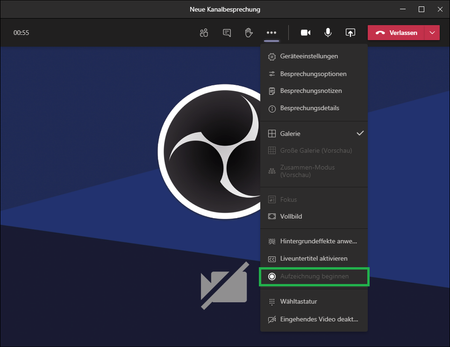

OK, OBS is no option.. So, let's continue researching.
I think the problem has something to do with the data storage region. As mentioned in the original post, Teams data are stored in Switzerland whereas Stream data are located in the EU. Therefore, the setting AllowRecordingStorageOutsideRegion should take care of this issue, but it somehow doesn't - at least not in the app.
On my test machine with a clean Windows 10 install, I tried to test the meeting recording feature with a user of another Microsoft 365 tenant which has both Teams and Stream data located in the EU (weird, because it's a swiss company) Result: It just works.
Is there any way to pass this to Microsoft? At this point, I think I should mention that we're currently using the Teams Exploratory license, which is (based on my research) feature equivalent to E1. So I don't think that could be the cause.

- pbeck3454Dec 08, 2020Copper Contributor
It's working now after changing RecordingStorageMode from Stream to OneDriveForBusiness. I guess Microsoft Stream based recording just won't work for most of swiss Teams users.
- ChristianBergstromDec 08, 2020Silver ContributorGood to hear! Still doesn’t explain why the app couldn’t be used and only the browser. Anyway, thanks for the update!