Forum Discussion

StephanGee
Sep 04, 2020Steel Contributor
Lists tab: Incident template - apply label everywhere
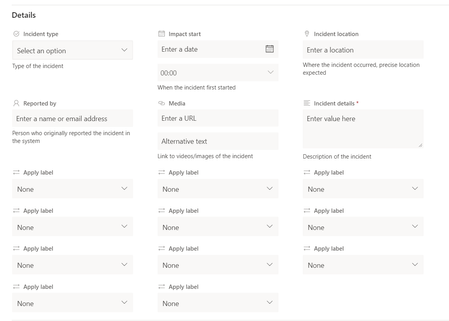
Hi everyone, i just tried out MS Lists for managing security incidents. But if i want to enter any details it seems that i can "apply label" for every field. I think that is a bit overhelm...
 Sep 12, 2020Hi,
Found a temporary solution. Remove/disable the retention policy. It removed the Apply Lable drop down menu altogether. However, check that the retention policy is not a requirement for your organisation under GDPR.

ChrisMenningNWTC
Sep 09, 2020Copper Contributor
StephanGee I am also having this exact same issue. The retention label column behaves normally in SharePoint and in the Lists web application, but this bug occurs whenever I create a new list item in the Lists for Teams app.

StephanGee
Sep 09, 2020Steel Contributor
We are "using" the basic retention labels that MS provided some time ago. Do you have customized retention labels?
I have no time at the moment to open up a support case as it is more a cosmetic problem and we receive no support calls on it.
- ChrisMenningNWTCSep 09, 2020Copper ContributorI am indeed using some custom retention labels. I opened a support case with Microsoft a week ago. After four calls with them, they've reproduced the bug and have confirmed that this is indeed a design issue and not anything to do with how we've configured our retention labels. Unfortunately, the MS rep I spoke with was not able to point me toward any official bug reporting area and instead had me create a User Voice issue. I'm not thrilled about that because I've seen many legitimate User Voice issues go un-resolved for years. But in case you're interested, here's the User Voice: https://microsoftteams.uservoice.com/forums/908686-bug-reports/suggestions/41350018-teams-retention-labels
 DeletedSep 11, 2020Not applicable
ChrisMenningNWTC I am seeing the same problem too. Initially when you set up the list it seems OK. However as soon as I add a new item the for each field I enter data in to is adding another 'Apply label' field.
- moranoxSep 12, 2020Copper ContributorHi,
Found a temporary solution. Remove/disable the retention policy. It removed the Apply Lable drop down menu altogether. However, check that the retention policy is not a requirement for your organisation under GDPR.