Forum Discussion

License error for Teams to Teams external call
- Jul 03, 2021
Thanks for coming back to me
The dial pad field in the calls app does not accept email addresses. It only accepts name or number so it will only come up with suggestions typing out the first name or surname of the user or a phone number. It doesn't recognise email addresses. That is expected behavior
As you say, you can do it in the search bar and then cache the external user. You can do it directly in the chat app too by searching for an external user and then starting a federated call via the phone icon on the same screen
Hope that answers your question! Glad it is resolved
Best, Chris

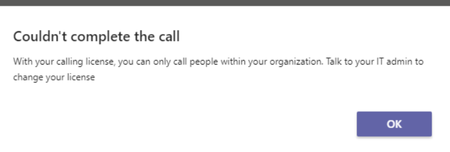
I've spoken with the affected user and it seems that she was typing the external e-mail address into the calls app in Teams and this does indeed give the same error when I try it:
However, I then showed her how to search for the external user using the main search bar in Teams and this worked fine:
Once the external user is added this way it is then possible to search for them using the search function in the calls app.

Thanks for coming back to me
The dial pad field in the calls app does not accept email addresses. It only accepts name or number so it will only come up with suggestions typing out the first name or surname of the user or a phone number. It doesn't recognise email addresses. That is expected behavior
As you say, you can do it in the search bar and then cache the external user. You can do it directly in the chat app too by searching for an external user and then starting a federated call via the phone icon on the same screen
Hope that answers your question! Glad it is resolved
Best, Chris