Forum Discussion

pncrmps
May 20, 2021Copper Contributor
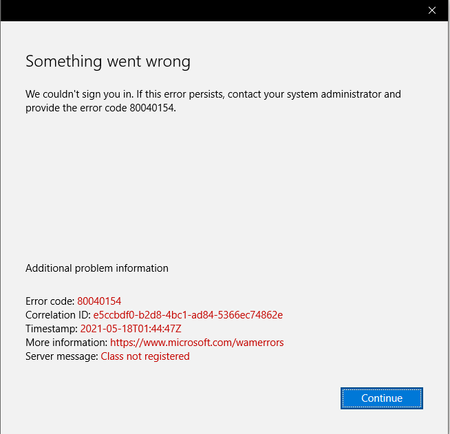
I could not change Organization.
Please help me. Everytime I tried to change organization, I always got this error. Been using my personal account lately and now I need to go back to my work account. Everytime I finished filli...
- May 20, 2021
Hi, this a really fast way to reset settings that can interfere, just copy the script and run it in PowerShell. If that doesn't work you can reset your Teams desktop app and clear some credentials manually. But try this first https://docs.microsoft.com/en-us/microsoftteams/scripts/powershell-script-teams-reset-autostart

May 20, 2021
Hi, this a really fast way to reset settings that can interfere, just copy the script and run it in PowerShell. If that doesn't work you can reset your Teams desktop app and clear some credentials manually. But try this first https://docs.microsoft.com/en-us/microsoftteams/scripts/powershell-script-teams-reset-autostart
 pncrmpsJun 10, 2021Copper ContributorThank you for your help. Unfortunately, I've tried both the PowerShell and deleting credentials manually by deleting the files in my AppData/Roaming/Microsoft/Teams and none seemed to work.
- Jun 10, 2021Can you access your work org. using Teams online? (go InPrivate). Any difference if you remove your account/s from W10 settings and re-add it/them?
WAM is the default token broker on Windows 10 devices so it's related to that.