Forum Discussion

I can't switch back to Teams chat with Alt+Tab on Mac
 Apr 13, 2021
Ok, I found a "solution" to force Teams to use the notifications.
Simple version:
01. You go to your teams https://teams.microsoft.com02. When it asks for notifications, give the permission and that's it.
As an App in your dock:
02. You copy the URL from your logged-in teams-tab (01.)
03. You install Epichrome
(Very useful, you can wrap a Website as a App and it appears in the dock. Basically is MS doing the same with their "App" except it uses Electron, Epichrome uses Chrome or Brave.)
04. Start it, go through the wizard, when it asks for the URL, give your Teams-URL and a fine name for it.
(Icon can be automatically downloaded)
05. Start the new app, log in, give permission for notifications. Since it is basically a browser, it is forced to use the default MacOS Notifications. Alt-Tab works again.
Alternatively, there is a way to make a WebApp with chrome. But I never use chrome.

Teams is a nightmare to use currently when you have multiple physical screens and multiple virtual desktops. Apple manages to have the menu bar wherever and alt tab does not go back to Teams. This combination of excellent user experience makes it rather slow to find the unmute button during a call.

 jbloomerFeb 19, 2021Copper ContributorMy problem is that separate little control panel gets buried behind all of my other screens, and the only way to get to it is to minimize any other windows. HIGHLY frustrating.
- D_ClaxtonFeb 17, 2021Brass Contributor
To whom ever confirmed this as the best response..
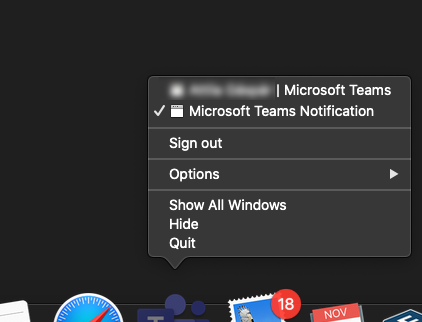
The issue is the MS Teams Notification Window on MAC becomes "checked" and there is no window to be closed, thus disabling the alt-tab to MS Teams.
Quitting Teams is they only way I have to rid the notification window until the next time it becomes active (checked).
This is not about the new meeting experience and the broke out window of the meeting controls.