Forum Discussion

How to change default meeting option for who can present org wide?
- Jul 22, 2020Take a look at meeting policies: https://docs.microsoft.com/en-us/microsoftteams/meeting-policies-in-teams This is something you can configure with PowerShell

Thank you for the information. When I make this change via PowerShell will take effect right away or will it take a little time to propagate through our tenant?

- JR_McVickerJul 23, 2020Tin Contributor
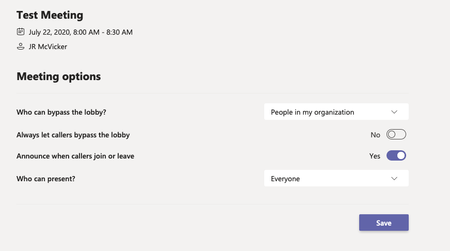
Morning Juan. Here is the change that I made yesterday. I just created a test meeting and checked the meeting options and it still is showing everyone for who can present. Any other suggestions?
- JR_McVickerJul 23, 2020Tin Contributor
Actually I think I just discovered my issue. I was editing the Global meeting policy and incorrectly assumed that all of our users were assigned that policy. I did a little spot checking and it seems everyone in our department is assigned https://admin.teams.microsoft.com/policies/meetings/edit/UmVzdHJpY3RlZEFub255bW91c0FjY2Vzcw== and I forgot that I assigned my self a test policy. Oops. Now I'm waiting for the changes and will test again.
 Ad_de_RooJan 22, 2021Tin Contributor
I have the same issue. Did you ever find why the users are assigned the https://admin.teams.microsoft.com/policies/meetings/edit/UmVzdHJpY3RlZEFub255bW91c0FjY2Vzcw== policy instead of the Global policy? In my global policy the option for who can present is set to OrganizerOnlyUserOverride, but the assigned policy https://admin.teams.microsoft.com/policies/meetings/edit/UmVzdHJpY3RlZEFub255bW91c0FjY2Vzcw== policy, which everybody is assigned to, sets to everybody is presenter, and this policy is not editable.. My solution was to make a custom policy and assign this to the usersgroups as an alternative Global policy.. to override the https://admin.teams.microsoft.com/policies/meetings/edit/UmVzdHJpY3RlZEFub255bW91c0FjY2Vzcw== policy