Forum Discussion

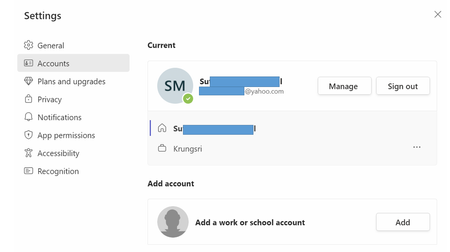
how I delete user in the same account
- Jul 19, 2023
Hi diamondsingto,
To remove the user account "Krungsri" from Microsoft Teams, please follow these steps:
1. Open Microsoft Teams.
2. In the top right corner of the Microsoft Teams interface, click on your account picture or icon.
3. From the drop-down menu, select the account you want to remove (Krungsri).
4. A new Microsoft Teams window will open with the Krungsri account. Locate the account picture or icon associated with the Krungsri account within that window.
5. Click on the account picture or icon, and then select "Sign out" to log out of the Krungsri account.
By signing out of the Krungsri account, you will remove it from your active accounts in Microsoft Teams. This will help ensure that you only use your main account.
It is possible that the Microsoft Teams client app doesn't open after you sign out the unwanted account, simple PC reboot can help.Please click Mark as Best Response & Like if my post helped you to solve your issue.
This will help others to find the correct solution easily. It also closes the item.If the post was useful in other ways, please consider giving it Like.
Kindest regards,
Leon Pavesic

Hi diamondsingto,
To remove the user account "Krungsri" from Microsoft Teams, please follow these steps:
1. Open Microsoft Teams.
2. In the top right corner of the Microsoft Teams interface, click on your account picture or icon.
3. From the drop-down menu, select the account you want to remove (Krungsri).
4. A new Microsoft Teams window will open with the Krungsri account. Locate the account picture or icon associated with the Krungsri account within that window.
5. Click on the account picture or icon, and then select "Sign out" to log out of the Krungsri account.
By signing out of the Krungsri account, you will remove it from your active accounts in Microsoft Teams. This will help ensure that you only use your main account.
It is possible that the Microsoft Teams client app doesn't open after you sign out the unwanted account, simple PC reboot can help.
Please click Mark as Best Response & Like if my post helped you to solve your issue.
This will help others to find the correct solution easily. It also closes the item.
If the post was useful in other ways, please consider giving it Like.
Kindest regards,
Leon Pavesic
 diamondsingtoJul 24, 2023Copper Contributor