Forum Discussion

Bradley Wood
Dec 05, 2019Brass Contributor
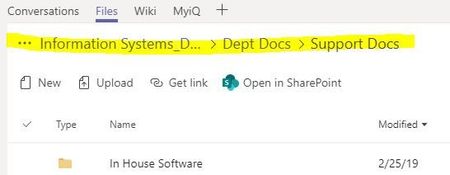
Files tab navigation
When navigating a SharePoint document library, through the Files tab in a Teams Channel ---- When actually navigating, I get a file path at the top which allows me to backup a folder or two ...

Dec 05, 2019
Yeah, too many folders :).
On a serious note thou, Teams doesn't save state anywhere and it's a big usability issue IMO, since you have the same thing happen with any PowerApp or Website tabs in Teams and you navigate off to answer a chat etc.
I'm hoping with pop out windows they think about some of this stuff and let us pop out a document edit etc. to help with things like this, but Honestly I always just use the Open in SharePoint option or Client when dealing with files instead of the Teams browser due to this issue.
On a serious note thou, Teams doesn't save state anywhere and it's a big usability issue IMO, since you have the same thing happen with any PowerApp or Website tabs in Teams and you navigate off to answer a chat etc.
I'm hoping with pop out windows they think about some of this stuff and let us pop out a document edit etc. to help with things like this, but Honestly I always just use the Open in SharePoint option or Client when dealing with files instead of the Teams browser due to this issue.

Bradley Wood
Dec 17, 2019Brass Contributor
"I always just use the Open in SharePoint option or Client when dealing with files instead of the Teams browser due to this issue."
which I think defeats the purpose and concept of "single pane of glass"
- Dec 17, 2019Agree but you got to work with what you have until it can improve.