Forum Discussion

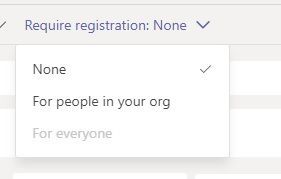
Enable Require Registration: For everyone
- Jun 04, 2021
HSVSIMON Hello, gonna add all the necessary config here.
-AllowMeetingRegistration
-WhoCanRegister
-AllowPrivateMeetingSchedulingTo allow users in organization to schedule webinars:
Set-CsTeamsMeetingPolicy -AllowMeetingRegistration $TrueTo allow only users in organization to register for webinars:
Set-CsTeamsMeetingPolicy -AllowPrivateMeetingScheduling $True
Set-CsTeamsMeetingPolicy -WhoCanRegister EveryoneInCompanyTo allow anyone, including anonymous users, to register for webinars
Set-CsTeamsMeetingPolicy -AllowPrivateMeetingScheduling $True
Set-CsTeamsMeetingPolicy -WhoCanRegister EveryoneAnonymous join must be enabled in Teams meeting settings for anonymous to join webinar.Microsoft Lists must be enabled
Set-SPOTenant -DisablePersonalListCreation $falseTeams view-only meeting experience if wanting to use overflow (when more than 1000).
Set-CsTeamsMeetingPolicy -Identity Global -StreamingAttendeeMode EnabledCollect meeting attendance
Set-CsTeamsMeetingPolicy -AllowEngagementReport Enabled

No need to have a form for normal meetings. This is usually how it looks from the organizer's perspective.
1. Schedules the webinar well in advance, usually by several weeks.
2. Prepares a registration form that each prospective attendee must fill out before receiving the webinar join info.
The form can be used to gather all sorts of useful info for post-webinar sales contacts, for example, or for measuring training effectiveness.
3. Sends out the webinar invite. If the webinar will feature additional presenters, the invite goes to them. (After this step, the registration link for potential attendees becomes active.)
4. Shares the event details and registration link with potential attendees. This can be on social media, on a web site, via email, or some other way.
5. Downloads the registration report for data about who registered and how they responded to the registration questions.

- Ahmed_Masoud97Feb 10, 2023Steel Contributor
Unfortunately for now for Teams it's not possible as "If you want to use webinars, meeting registration must be turned on" >>https://learn.microsoft.com/microsoftteams/set-up-webinars#configure-meeting-registration
Microsoft introduces nowadays new Teams Premium add-in license and says:
Currently, the basic webinar experience is controlled by meeting registration using the Teams Meeting policy (Set-CsTeamsMeetingPolicy).
**In the future, the meeting registration setting won't control webinars; webinars are transitioning over to being controlled by the Teams Events policy (Set-CsTeamsEventsPolicy).
Source: https://learn.microsoft.com/microsoftteams/set-up-webinars#configure-meeting-registration
Please let me know if you need any further assistance!
Regards,
 Jessica RodriguesMar 10, 2023Copper Contributor
Thank you for that. So to confirm, Webinars now require registration like Live Events. There is no way to disable registration?
- Ahmed_Masoud97Mar 15, 2023Steel ContributorThere is a way through PowerShell I think...
