Forum Discussion

Henry Edwards
May 27, 2020Brass Contributor
'Copy Link' for Folder/Files does not work in Teams
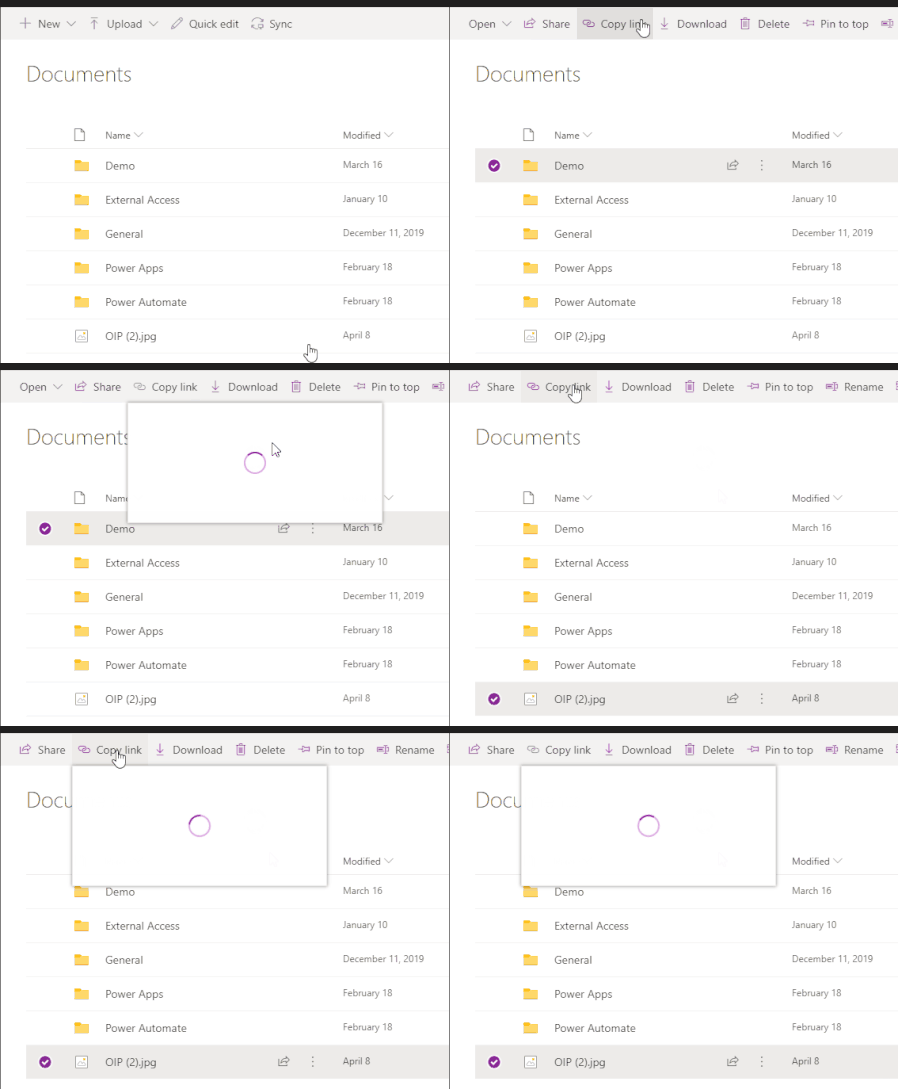
When you access a document library using the website/SharePoint tab and click on 'copy Link' the dialog opens up and has a spinning circle constantly, doesn't load.
 Jun 13, 2022
Great
It works for me as well!!!
Strange thing is mine updated 8th of june but only today it workedYesterday I thought, how can this still be possible as I had this issue for a very long period of time
(opening the Team in SharePoint the copy link always did work as workaround)
but happy now 🙂

tclark_mpg
Dec 17, 2021Tin Contributor
We experience this as well. 2 different users.
One user began experiencing this about a month ago. I gave her the workaround to open the document library in SharePoint then copy the link while we figured out a resolution.
Since then I uninstalled teams, cleared out all of the directories left behind, removed her account from the system, then reinstalled Teams.
She had the issue on version 1.4.00.29469. I updated her to 1.4.00.32771 and the issue persists.
I logged her in on my Teams app and her account works fine, so we know its just the Teams app on her system that has an issue.
I created a policy in our Teams Admin to allow public preview access and added her to that group. Turned on public preview on her Teams app and it logged her out then back in. Teams is still at the same update revision and the issue still exists.
One user began experiencing this about a month ago. I gave her the workaround to open the document library in SharePoint then copy the link while we figured out a resolution.
Since then I uninstalled teams, cleared out all of the directories left behind, removed her account from the system, then reinstalled Teams.
She had the issue on version 1.4.00.29469. I updated her to 1.4.00.32771 and the issue persists.
I logged her in on my Teams app and her account works fine, so we know its just the Teams app on her system that has an issue.
I created a policy in our Teams Admin to allow public preview access and added her to that group. Turned on public preview on her Teams app and it logged her out then back in. Teams is still at the same update revision and the issue still exists.