Forum Discussion

Dianne_NZ
Jun 07, 2023Iron Contributor
Contact list no longer available in new Teams version
When new teams go live, can I keep using the old version? The new version only has a chat list and no contact list. I regularly use my contact list to determine if someone is in the office. ...
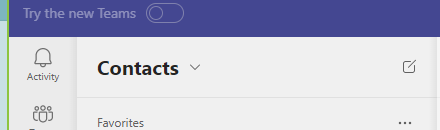

David_Kirk01
Apr 29, 2024Copper Contributor
As other have said please bring the contact list back. My company has just rolled out the new version, but thankfully we still have the option to use the old one (which I will be using)

greendragon
May 04, 2024Copper Contributor
They've extracted the contact list into a separate app.
Here's how to use it in a few clicks. It's pretty simple. The contact groups have been preserved, just pin the app and you have your contacts back.
https://www.youtube.com/watch?v=3hQ8ArAswNc
 Smitty814May 06, 2024Brass ContributorSorry, the People app is not the same thing and it came out months ago. We've talked about it quite a bit over the last couple of thread pages. Opposed to classic teams, new teams still takes too many clicks to see the status of people/groups. The old contacts had a much cleaner/easier layout.
- hps_steveMay 07, 2024Brass ContributorThis thread can die now. The 2 extra clicks mean the new system isn't as good. But it serves the same purpose. Ciao!
- gregc63May 07, 2024Brass ContributorThat's a terrible idea. Upgrades are supposed to make the app more friendly, not make you hunt and click more. The contact list was perfect, we could see everyone's status and chat with them right there unlike the People app. MSFT has been whiffing on quite a few of their "upgrades" lately, including the "new" Outlook, less feature on removed a lot of functionality. Horrible...
- BongoFuryMay 06, 2024Copper ContributorI dont think you understand.