Forum Discussion

JohnMM
Aug 26, 2020Brass Contributor
Can't Configure Azure DevOps Connector in Teams (HTTP ERROR 500)
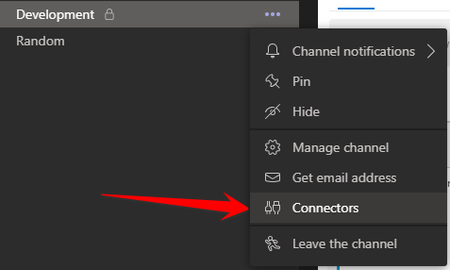
We are trying to configure the "Azure DevOps" connector in a Teams channel. It has already been added to the channel, so I go to the channel, click the three dots, and click "Connectors." ...
 Sep 14, 2020
JohnMMsheesh8080 Just got a call from MS to say they will be rolling out an update on the 17/18th of Sept! No indication of what the cause might be but hopefully we'll be able to get our ADO/Teams integration powers back this week 🙂

VanioVanio
Oct 28, 2020Tin Contributor
I have the same issue - it was working until yesterday when I had to replace expired token. Then I wasn't able to configure the connector anymore.
Can anyone here point out the case id in order to make a reference when I raise a new support ticket?
 JeChrOct 28, 2020Tin Contributor
VanioVanio I have the same issue. Yesterday it was not possible anymore to change a connector due to an invalid token. How did you replace it?
It's also not possible to add a new connector. I get the sign in screen, fill in all information but nothing happens.
- JackWagonOct 28, 2020Tin ContributorI'm having this exact issue but can use the Azure Pipelines BOT which at this point is a better approach to what I need.
See
https://docs.microsoft.com/en-us/azure/devops/pipelines/integrations/microsoft-teams?view=azure-devops
