Forum Discussion

Can not delete a user from Private Channel
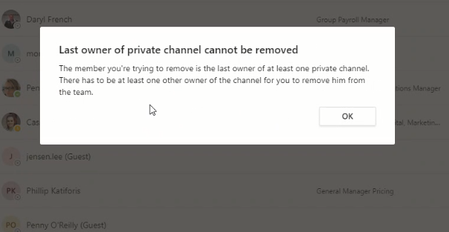

VasilMichev thanks Vasil for your response, the issue is I am not sure which channel she is the owner as we have 15 channels here .

Hi Harris021
If you go to Manage team > Channels, you can see a full list of channels including the Private ones.
On any private channels that you are not added to, you can click onto ... > Show channel owners and you can see if this user is a part of it. You'll have to repeat the steps for other private channels that you are not a member of.
For any channels that you are a member of, in the Channel tab, go to ... > Manage channel and see the members list.
A manual process but it will help you to track down where this person is listed as the last owner of a private channel.
Hope that helps.
Cheers and best wishes
Damien
- Harris021Jan 21, 2020Copper Contributor
Damien_Rosario Thanks Damien for your message.
Please see my finding at below:
I am the owner of the Team. and when I click on any channels I only see below options.
there is no show owners option here
- Damien_RosarioJan 21, 2020Silver Contributor
Hi Harris021
Basically two scenarios:
1. If there is a Private channel that you are not a part of, you'll get the Show channel owners option.
2. If you are a part of the Private channel, you can choose Manage channel and it will show you the Owners of the channel.
Cheers
Damien
- Harris021Jan 21, 2020Copper Contributor
- Damien_RosarioJan 21, 2020Silver Contributor
Hi Harris021
Manage team is in the ... of the team name itself. Your image appears to be the ... from a Channel.
Once in Manage team, go to Channels and you can see all channels listed to perform the earlier advice.
See how you go?
Cheers
Damien
- Harris021Jan 21, 2020Copper Contributor
Thanks for your response,
I managed to delete the user from MS Team admin centre, however I like to know why I cant see the options you can see
