Forum Discussion

Can not delete a user from Private Channel
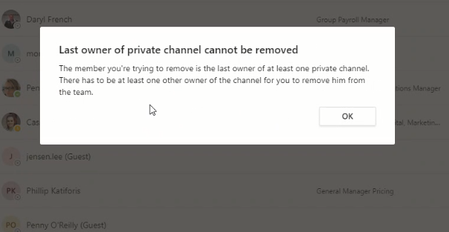

As the message suggests, the user is the last owner, so if you want to remove her you need to promote some other user to owner first. That said, changing an email address or display name shouldn't result in changing the underlying account or its group/team membership. Did you create a new account instead?
 Harris021Jan 21, 2020Copper Contributor
VasilMichev thanks Vasil for your response, the issue is I am not sure which channel she is the owner as we have 15 channels here .
- Damien_RosarioJan 21, 2020Silver Contributor
Hi Harris021
If you go to Manage team > Channels, you can see a full list of channels including the Private ones.
On any private channels that you are not added to, you can click onto ... > Show channel owners and you can see if this user is a part of it. You'll have to repeat the steps for other private channels that you are not a member of.
For any channels that you are a member of, in the Channel tab, go to ... > Manage channel and see the members list.
A manual process but it will help you to track down where this person is listed as the last owner of a private channel.
Hope that helps.
Cheers and best wishes
Damien
- Harris021Jan 21, 2020Copper Contributor
Damien_Rosario Thanks Damien for your message.
Please see my finding at below:
I am the owner of the Team. and when I click on any channels I only see below options.
there is no show owners option here
