Forum Discussion

superray72
Aug 03, 2021Brass Contributor
Automatic Teams Meeting Recoding
When enabling the automatic TMR in Meeting Options, Teams doesn't save the meeting to OD or SP. It saves the meeting in the chat only. When we disable then TMRs are saved in their respective locati...
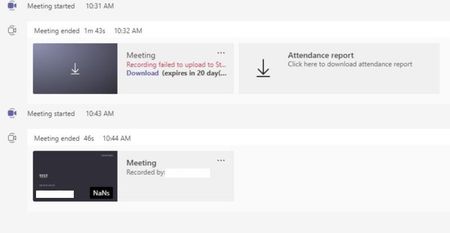
- Aug 03, 2021Hi Tony, thanks for adding to the conversation. I've managed to replicate it by setting the auto-record option toggle on and started the meeting as another user before I entered myself (this worked just fine with the recording ending up in the initiators OneDrive). I ended the meeting and entered back in with my own account right after and that reproduced the above "Failed to upload to Stream". When ending the meeting for a second time and joined again as myself all worked as intended, with the (now third) recording ending up in my OneDrive.

Aug 03, 2021
Hi Tony, thanks for adding to the conversation. I've managed to replicate it by setting the auto-record option toggle on and started the meeting as another user before I entered myself (this worked just fine with the recording ending up in the initiators OneDrive). I ended the meeting and entered back in with my own account right after and that reproduced the above "Failed to upload to Stream". When ending the meeting for a second time and joined again as myself all worked as intended, with the (now third) recording ending up in my OneDrive.

superray72
Aug 03, 2021Brass Contributor
It appears to be working as expected now! Not sure what was happening but someone else confirmed this earlier but it appears now all is good.
- superray72Aug 03, 2021Brass ContributorIf I am the organizer and I select auto start the recording, doesn't it make sense the recording shows up in the organizer's OD folder and not the random person that enters the meeting first and if a guest enters it doesn't even show in OD/SP but just in Chat. Oh vey! 🙂
- TonyRedmondAug 03, 2021MVPI think it's fair to say that Microsoft has accepted that some improvements can be made to the current implementation. The key is to make sure that relatively few people have the presenter role and for the owner to start the meeting...
