Forum Discussion

Add external user to a Microsoft Team unable to do this
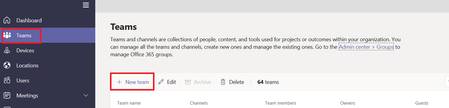

A question also: did you select this person when it was auto suggested or continue to type the full address?

adam deltinger wrote:
This should be possible though! Also if this was a existing guest account in your AAD the person should come up as soon as you start typing the name!
A question also: did you select this person when it was auto suggested or continue to type the full address?
adam deltingertried both appraochies and get the same error... also i do not think i have a configuration or setting issue, because as mentioned before if i went to the Guest user from Office 365 >> Active users>> select a guest account >> edit members group >> i were able to add the guest to the Teams/Office-365.. but could not do this from MS Teams, Office 365 or sharepoint..
- john johnJun 20, 2019Iron Contributor
ChrisWebbTech wrote:
I'll have to set this up when I get a bit later and see If I can reproduce.ChrisWebbTechok thanks let me know how it goes
- Jun 19, 2019I'll have to set this up when I get a bit later and see If I can reproduce.
- john johnJun 19, 2019Iron Contributor
ChrisWebbTech wrote:
Oh yeh there’s that link lol.ChrisWebbTechno problem, but going back to my original question why we can not add external users to Teams from the sharepoint site?? while the same user can add the same external user from MS Teams desktop app?
- Jun 19, 2019Oh yeh there’s that link lol.
- john johnJun 19, 2019Iron Contributor
ChrisWebbTech wrote:
You are going to the wrong place in share point to add members it’s not under site permissions you have to go to the group membership from the homepage at the top right there’s a link there saying how many members are in the group and that is where are you at group membersChrisWebbTech no it is not the wrong place .. clicking on the link which saying how many members is exactly the same as going to "site permission" >> "Invite people" >> selecting "add members to group" , as follow:-
this will add members to the office 365 group, it will work if i do it for internal user. now if from the above screen i select "share site only" then this will only add the user to sharepoint, but my steps are the same as what you are mentioning, try this from your end...
- Jun 19, 2019You are going to the wrong place in share point to add members it’s not under site permissions you have to go to the group membership from the homepage at the top right there’s a link there saying how many members are in the group and that is where are you at group members
- john johnJun 19, 2019Iron Contributor
ChrisWebbTech wrote:Admin center just doens't support adding guest accounts. You can do it from Teams Desktop, Web, or Mobile, but you have to be a Team Owner to invite the guests.
ok understood, thanks for the info.
You can do it from SharePoint, but you have to click the Group link "x members" on the top right of the site homepage, this will give you the group members flyout, where you can add there.yes i know that i need to add them to the group and not to the SharePoint site,but this did not work, here is my test:-
1. i created a new Teams using the admin center and using the office 365 admin.
2. then from the Team admin center >> i add my username >>i grant my username owner on the Teams.
3. so i access the sharepoint site using my username (which is an owner) >> click on "Site Permission" >> "Invite People" >> "add members to group" (to add them to the office 365 group and not to SP site only) , as follow:-
>> then i type-in the external user yahoo email >> click on share >> i will get this error>>
i also try to do this using the Office 365 admin, but got the same error. i thought this error might be related to the fact that we only allow office 365 admin to share sharepoint site with external.
now when i login to the Team desktop app using my username i were able to share the Team with the external user. so from this; seems that Team owners can only invite external user from the Team desktop app + they can not do so from the sharepoint site. same applies to Office 365 admin who can not share Team with external using the Teams central admin or using the sharepoint site....
- Jun 19, 2019
Right, because you are inviting to the SharePoint site only if done from SharePoint. Admin center just doens't support adding guest accounts. You can do it from Teams Desktop, Web, or Mobile, but you have to be a Team Owner to invite the guests.
You can do it from SharePoint, but you have to click the Group link "x members" on the top right of the site homepage, this will give you the group members flyout, where you can add there.
- john johnJun 19, 2019Iron Contributor
ChrisWebbTech wrote:
Yes, you cannot add guests through the admin center which you were originally trying to do. You have to add them through Teams client itself.Thanks for the reply. so you mean to add guests to Teams i can only do it from MS Teams desktop app only? and i can not do it from Team admin center or even from sharepoint site (using site permissions >>"Invite People">> "add members to group")??
- Jun 19, 2019Yes, you cannot add guests through the admin center which you were originally trying to do. You have to add them through Teams client itself.
- Jun 19, 2019Yes, but I was referring to the desktop app adding the person there!
- john johnJun 19, 2019Iron Contributor
adam deltinger wrote:
Wait, with what account did you get error messages in teams with before??adam deltingerI got the error with the office 365 admin, actually no one can access MS Team admin center unless the user is office 365 admin. baring in mind that i created the MS Team using Office 365 admin!!
- Jun 19, 2019Wait, with what account did you get error messages in teams with before??
- john johnJun 19, 2019Iron Contributor
kevinmckeown8 wrote:john john Does your Office 365 Admin account have a license assigned to it or is it just setup with a Global Admin role and no license?
I have seen that doing certain tasks with a Global Admin account that does not have any license assigned, can result in strange errors or scenarios like the one you are seeing where something just doesn't work as expected.
kevinmckeown8 I think the admin does not have a license or mail box.. but using the Office 365 admin i created the MS Team i am asking about (as mentioned in my original question.), so not sure if he actually have a license or not? or the admin can create MS Team even if he does bot have license?
But i login using my username which has a license to teams and also whom is the Team owner, and i tried to add an external user from sharepoint site , where i got this error:-
while when i try to add the same external user from my Teams desktop app, i were able to add an external users.. looks weird :)
- Jun 19, 2019If that account had no license, it couldn’t enter the Teams App at all
- kevinmckeown8Jun 19, 2019Iron Contributor
john john Does your Office 365 Admin account have a license assigned to it or is it just setup with a Global Admin role and no license?
I have seen that doing certain tasks with a Global Admin account that does not have any license assigned, can result in strange errors or scenarios like the one you are seeing where something just doesn't work as expected.
- Jun 19, 2019Yeah! This seems to be the issue then!
- john johnJun 19, 2019Iron Contributor
adam deltinger wrote:
Did you add the other guests yourself or was it someone else? Is the account you are using an admin account? It could be that members aren’t allowed to add guests setting in Azure ad portal
Also can you add the guest from the teams admin portal?adam deltinger i am using the office 365 admin... now using my username (group owner) i were able to add external user to the Team using the desktop app !!! the whole thing is becoming unclear..
- Jun 19, 2019Did you add the other guests yourself or was it someone else? Is the account you are using an admin account? It could be that members aren’t allowed to add guests setting in Azure ad portal
Also can you add the guest from the teams admin portal?

