Forum Discussion

CharlieK95
Apr 28, 2023Copper Contributor
Possibly "Tricky" KQL for Alerts over Time / Split into a Comparison
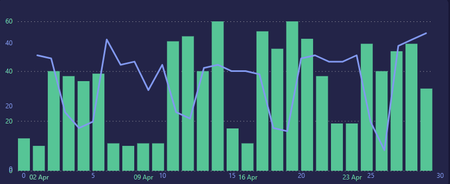
Hey! I hope you're doing well I've been pulling my hair out over some what I think might be impossible, or tricky KQL (but then again - I could be missing something). I have a report that doe...

GBushey
May 01, 2023Former Employee
I haven't worked through this entirely, but have you looked at the table merge feature in Workbooks? You could write two different queries to get the data you need and then merge them into a third workbook query.

Clive_Watson
May 02, 2023Bronze Contributor
I'm not sure its possible, the closest I have come to this is to position a Chart above a chart in a workbook, or do a side-by-side compare, e.g.
SecurityIncident
| summarize 30days_=countif(TimeGenerated between (startofday(ago(30d)) .. now())),
60days_=countif(TimeGenerated between (ago(60d) .. endofday(ago(31d))))
by bin(TimeGenerated,1d )
| render columnchart
SecurityIncident
| summarize 30days_=countif(TimeGenerated between (startofday(ago(30d)) .. now())),
60days_=countif(TimeGenerated between (ago(60d) .. endofday(ago(31d))))
by bin(TimeGenerated,1d )
| render columnchart