Forum Discussion

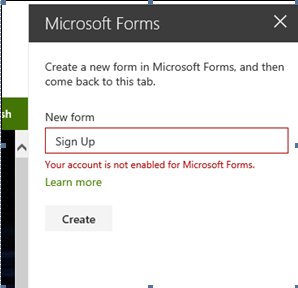
Your account is not enabled for Microsoft Forms Error
- Nov 07, 2018In Admin Center admin can search for your user or find it in Users menu, click on a user and in side panel go to Licenses (don't remember exact wording now), then expand the license assigned to a user (say E1 or E3) and then one can toggle individual apps and services on and off. Press Save at the bottom after making changes.
If Forms is not in this list, then maybe Forms needs to be enabled for the tenant, but i think you wouldn't get to that error if it wasn't enabled already and it should be enabled for all as Forms is out of preview stage. But you can still check in Settings > Services & add-ins > Microsoft Forms.
Or maybe your license doesn't include Forms. What license/plan do you have?


SteveHatesAI Me as well, customer is experiencing same thing. I checked, E3 license is active. Customer also stated that she was able to log in the other day and now it is not letting her in.
I logged in to forms myself, successfully.

I just expiriencing this myself a few hours ago. I am the administrator of my company office 365 tenant. Checked the licenses and making sure the form license is active, disabling and reenabling the license, to no avail.
The last time I am using the Forms is in the Microsoft Teams, to create some quick poll with @Forms bot (https://techcommunity.microsoft.com/t5/microsoft-forms-blog/microsoft-forms-works-great-with-microsoft-teams/ba-p/109915) and polling card in the post section. After that, I can't acces Microsoft Forms anymore.
 FM___Feb 08, 2020Copper ContributorI have encountered the problem as you mentioned, what's the solution? Thank you!
- dimasputraFeb 09, 2020Tin ContributorYou just need to wait for a few hours, or wait until the next day.
- JeremyMillerFeb 06, 2020MVP
dimasputra Approximately 24 hours after the initial failure things seemed to resolve on their own. Are you seeing the same?
- dimasputraFeb 09, 2020Tin Contributor
JeremyMiller It resolved on it's own in about 12 hours.
- JeremyMillerFeb 06, 2020MVP
dimasputra I'm able to reproduce the same issue. Checking to see if this is a known issue now and will report back when I have more info.
