Forum Discussion

sprengch
Jan 22, 2024Copper Contributor
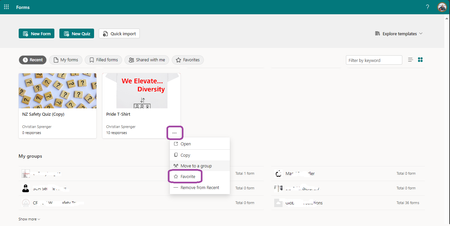
How do I add a (not mine) Forms to Favorite without having it Recent?
Our organization created a Forms for a specific survey. I have not filled out this Forms because it does not apply to me, but I need to be able to send this to others. Therefore, I do not have "add ...

DingkunXie Microsoft
Jan 22, 2024MicrosoftIf you are the form owner, you should be able to find it under the 'My Forms' tab. If you are not the owner, you should ask the form owner to send you the co-author link. After accessing the form through the co-author link, you should be able to find it under the 'Shared with me' tab.
- sprengchJan 22, 2024Copper Contributor
DingkunXie thank you for your reply.
As mentioned, I am not the owner, as I do not have it under "my forms"
I also will not be added as Co-Author, as I am not entitled.
So that means, that only Forms I own or I have filled out already (which mostly I have no use of any longer) can be added to "Favorites?
Sounds pretty useless to me. I thought maybe I am missing something, this is why I ask. But anyway, if this is Microsofts intention then it is. peiyezhuJan 23, 2024Bronze ContributorIf your intention is to submitt form,how about adding the url to browser's my Favorite and email the url.
- sprengchJan 23, 2024Copper ContributorYes, I do can bookmark in my browser, but then it is browser related.
If Microsoft is already providing the option to Favorite, I am wondering why only for own created and already filled in forms?
I do can use browser bookmarks, but then I have a huge list of something. Here I would have something related to it.
