Forum Discussion

lrc5333
Jan 21, 2020Copper Contributor
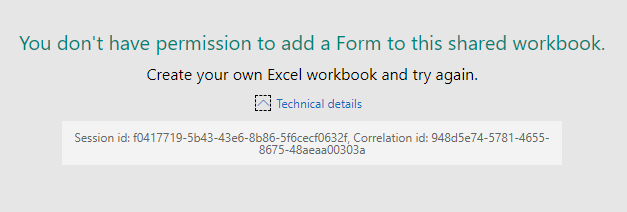
Error when attempting to add a Form to an Excel workbook
We have a user that is receiving the following error: "You don't have permission to add a Form to this shared workbook. Create your own Excel workbook and try again." This happens when the u...
 Jan 29, 2020
RespectandPeace Griefblade mgudites1 gtew234 TheJakes
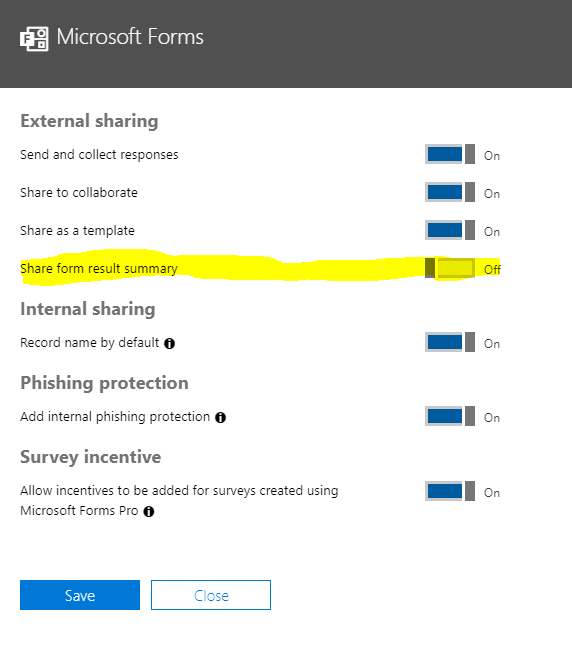
Microsoft got back to me with a fix that resolved this issue for our tenant. In the Office 365 admin center, navigate to Settings >> Services & add-ins >> Microsoft Forms. Toggle On the "Share form result summary" option if it's off (we have every option in here enabled).

mgudites1
Jan 24, 2020Brass Contributor
I don't know if this helps but I was also able to go directly to forms.office.com and create a shared group form for the group in question. Doesn't solve the problem of wanting to have the document placed within the doc library but, for now it's a workaround here. I just put URL shortcuts into the doc library so the team could easily access the form and the 'results' page.