Forum Discussion

Clicking on an email address in a drop down list opens up Outlook
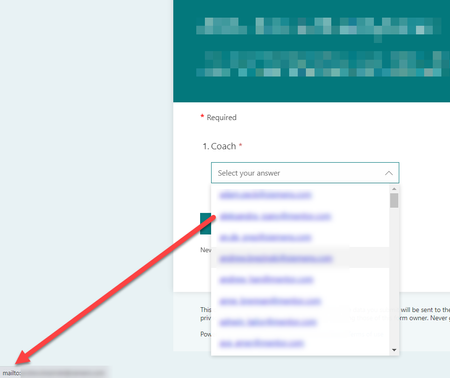

ccarcallas I'm having the same issue and am trying to achieve the same result: select an email and use it in a Power Automate Flow to send an email. There is a workaround, but it takes a couple extra steps. If you replace the period in the email in the domain name (@company.com) with a https://www.compart.com/en/unicode/U+2024 ("․"), MS Forms will not recognize this as linkable text because it is not an actual period.
From there, you can use a function in Power Automate to replace the unicode character in the selected email address with a regular period prior to inserting the email address. You could do this with a Compose action ahead of time to keep things easy to read, or add the function directly into the email field. I have screenshot the compose action below, as this is my preference. You would then use the output of the compose as your email address in the Send Email step.
You can use this formula to replace the unicode stand-in: replace(outputs(ADD DYNAMIC CONTENT HERE),'․','.')
Because the character swap may not be obvious to others, I added a note on my compose step in case anyone else ever needs to understand this action.
Hope this helps!

Hi, this would a great work around but some reason its not working for me. Can you help?
Flow save failed with code 'InvalidTemplate' and message 'The template validation failed: 'The template action 'Compose' at line '1' and column '5536' is not valid: "The template function 'outputs' is not expected at this location.".'.'.
 jerome190May 05, 2025Tin Contributor
Hi DSJAMES, This post is about replacing dot in an email address in a choice columns in forms with a https://www.compart.com/en/unicode/U+2024 ("․") in order to not recognize this as linkable text. Your screen capture seem to demonstrate something else... you should start a new thread in order to ask a new question and get tailored answer.