Forum Discussion

Clicking on an email address in a drop down list opens up Outlook
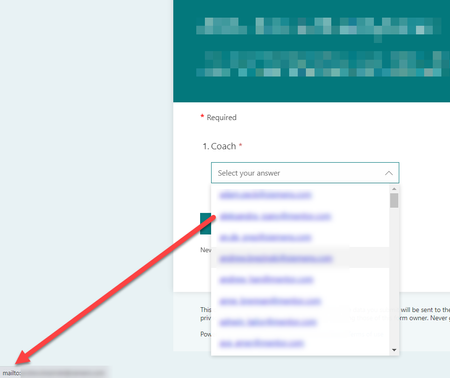

I did come up with a work around, however I'm not sure if this will work for you unless your emails are similar. Our company emails are formatted as such: (firstname.lastname @ company.com) . In the dropdown the options are displayed as firstname.lastname which will become the dynamic content in the flow, (i.e., email). In the To: part of the email I inserted the email dynamic content and right after entered the text @company.com. emsneds

mike4465 I actually started with that workaround in mind, but it didn’t make sense with the way our form was written, and I didn’t think our stakeholders would go for it. (If I didn’t have the email address in the dropdown, the next option was supposed to be the person’s name, which would create more work to implement in Power Automate than my proposed workaround). My colleagues don’t fully understand the capabilities of Power Automate or even MS Forms, so I wanted to find a workaround that would display the full email address without linking it.
- mike4465Oct 16, 2023Copper Contributor
I know they take up more space on the form, but instead of a dropdown, could you use 'options' to make the selection?
- emsnedsOct 18, 2023Tin Contributor
mike4465 Theoretically, yes, but in my case we have something like 13 options, so it’s not ideal. They are also still linked based on your screenshot, which is preferable to avoid. We don’t trust that our users will 100% of the time click on the radio button instead of the text, and opening the link would almost certainly cause complaints about the form.
I did, however, find the workaround using the Unicode character in place of the period in the domain name. It works without issue since I’ve set it up and I am happy with it.
- mike4465Oct 18, 2023Copper Contributor
Can you explain how you inserted the code? I've tried 2024+alt+x, which nothing happens and I've tried alt+46, which inserts the dot, but it still displays as a link. I followed the steps outlined here: https://support.microsoft.com/en-gb/office/insert-ascii-or-unicode-latin-based-symbols-and-characters-d13f58d3-7bcb-44a7-a4d5-972ee12e50e0#:~:text=Inserting%20Unicode%20characters,ALT%2C%20and%20then%20press%20X.emsneds