Forum Discussion

ccarcallas
Jan 28, 2021Copper Contributor
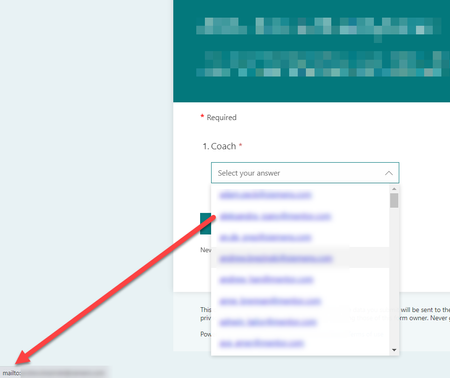
Clicking on an email address in a drop down list opens up Outlook
I have a form with one of the fields being Email Address (~100 entries). When our users get to this drop down, the list is shown as a hyperlink list of email addresses. Naturally, when they click on ...

RobElliott
Jan 29, 2021Silver Contributor
ccarcallas Forms automatically recognises the @ symbol and the . dot extension and creates the hyperlink automatically. The only way you can really get round this is to replace the @ and the dot with some text, for example [at] and [dot]:
Rob
Los Gallardos
Microsoft Power Automate Community Super User

mike4465
Jul 25, 2022Copper Contributor
I have the same issue, however that won't work for me as I'm using them in a flow to generate and email to the individual. Any other suggestions?RobElliott
- SandfordAdamOct 02, 2023Copper Contributor
mike4465 I had a similar issue, so just added a lookup to the final column, storing the emails in another sheet. Seems to be working ok.
 emsnedsOct 18, 2023Tin ContributorCan you explain what you mean by this and the steps you used? Are you using MS Forms?
- RobElliottJul 25, 2022Silver ContributorNope, there's nothing else you can do.