Forum Discussion

Branching Bug in MS Forms Pro Trial
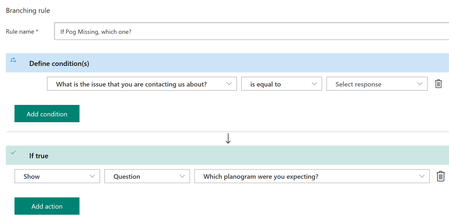

Hi SDBrown
You aren't doing anything wrong as far as I can tell. You have set your condition/s with if True (and presumably with False) and have saved it.
When you save, do you see the correct condition on the Branching rules screen?
I've also mocked up what you have done and have no issues at all in my test survey.
If the above isn't happening in the Branching rules screen, you may want to try creating a new survey and trying again (if practical). Might be your current one is buggy.
Best wishes and good luck!
Cheers
Damien

Hi
When I copy an existing form in MS Form Pro sections and the branching are left out. This all worked perfectly until I accepted a request from MS to update from Forms to Pro.
How can I swap back to just plain old forms, Pro is incredibly slow, it reloads the entire page as the back arrow to go from preview back to the host page has gone?
Frustrated doesn't describe how i'm feeling now, your help will be appreciated. Damien_Rosario
- Damien_RosarioFeb 03, 2020Silver Contributor
Hi paulodo
If you are on the Forms Pro trial, give these opt-out instructions a whirl!
https://docs.microsoft.com/en-us/forms-pro/get-started#opt-out-of-trial
Cheers
Damien
