Forum Discussion

On Mac M365 copilot app error
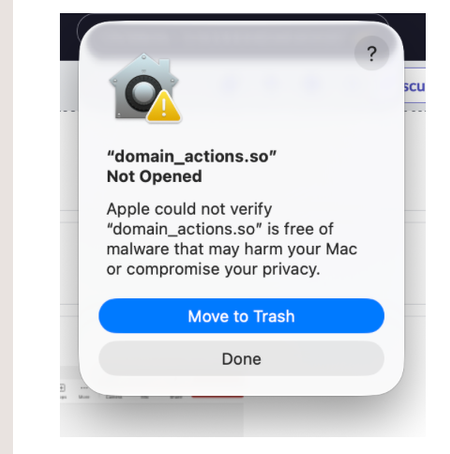

Saw this issue pop up during our own architectural teardown of Copilot. Quick question for the MS engineering team:
Why is an unsigned core module (domain_actions.so) even showing up in user-facing builds?
This isn’t a Copilot-specific flaw—it’s a fundamental deployment blind spot. macOS Gatekeeper blocks unsigned dynamic libraries by default. If a file like this appears during normal installation:
It likely means a middleware or helper module failed Apple’s notarization.
There's no fallback prompt or proper privilege escalation.
End users are left with zero guidance and a system-level block.
Translation: This isn't a “bug”, it’s a packaging failure or a missing endpoint validation mechanism in the deployment pipeline.
Temporary Fix (If You're Confident It's Legit):
sudo xattr -r -d com.apple.quarantine /Applications/Microsoft\ 365\ Copilot.app
Then:
System Settings → Privacy & Security → Allow "domain_actions.so" under security override
But always back it up first. If the .so module was side-loaded or manipulated, you're better off deleting and watching for regression.
Architectural Context:
We’re building an alternative mediation layer (EDCA – Expression-Driven Cognitive Architecture) that solves this exact type of fragmentation:
Structured task delegation
Multi-path fallback detection
Semantic anchoring to reduce reactive prompt collisions
Copilot shouldn’t rely on low-level plugins to mediate high-level expression intent. This .so error is a symptom of structural opacity.
Why It Matters:
macOS isn’t just "another OS"—it’s opinionated and user-hostile to low-trust binaries.
End users shouldn’t be your QA testers for notarization compliance.
Copilot’s future requires stronger control protocols, not just more embedded helpers.
We’re testing such protocols right now—happy to swap notes.