Forum Discussion

Custom Copilot Skills Not Showing in Excel for the Web, but Working in Desktop Excel and PowerPoint
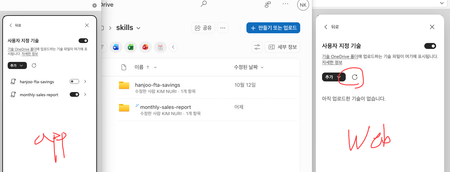

Yes, Custom Skills are supported in Excel for the Web, but availability is subject to Microsoft's rollout.
Microsoft's June 2026 announcement said:
- Custom Skills were initially available in Excel Insider builds for Windows and Mac.
- Web availability was scheduled for general rollout the following month.
- Availability could vary by account, region and licensing.
What I would try:
1. In Excel Web, open Copilot → Settings (...) → Manage plugins & skills.
2. Check whether your custom skills are listed and enabled.
3. Confirm they are saved in the correct OneDrive skills folder.
4. Try signing out and back in, then reopen Excel Web.
Microsoft's support documentation confirms that custom skills are stored in OneDrive.
My assessment: This looks more like a staged rollout or web-specific issue than a synchronization problem, particularly since the same skills work in desktop Excel.
I'd ask Microsoft Support to confirm whether Custom Skills are enabled for your specific Microsoft 365 tenant and account.