Forum Discussion

Custom Copilot Skills Not Showing in Excel for the Web, but Working in Desktop Excel and PowerPoint
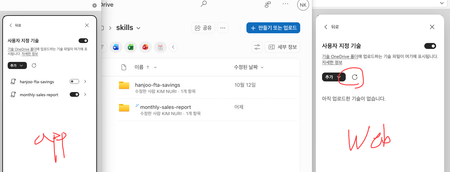

Microsoft announced custom skills for Excel on the web as part of the rollout, so the announcement supports web availability; it doesn’t establish why your three accounts show different results. Your screenshot shows the custom-skills refresh control in the web pane.
Open Excel on the web and desktop with the same signed-in identity and compare the OneDrive skills folder each session opens. In Copilot, choose Settings > Manage plugins & skills > Custom skills and try Refresh after confirming that the files are present. Microsoft specifies a separate folder for each skill with a SKILL.md file and matching folder and skill names.
If the list is still empty, send Microsoft Support the account type, tenant, browser, Excel build and a redacted screenshot, and ask whether the capability is enabled for that environment. Continue using the desktop app as your tested workaround; the evidence doesn’t yet distinguish rollout from a defect.