Forum Discussion

Add a "Print Conversation" Feature in Microsoft Copilot
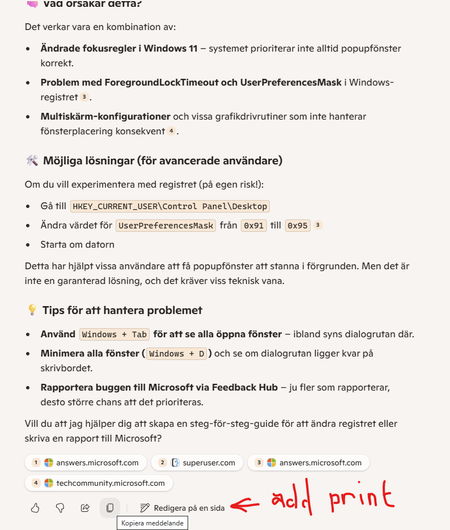
- Jul 29, 2025
Hi, can I ask a quick follow-up question?
Are you using Copilot Chat as part of your Microsoft 365 license (e.g. Business or Enterprise, with or without Microsoft 365 Copilot add-on license), or are you using the free Copilot Chat experience for personal use in Edge?From the look of your screenshot, it seems you're using Copilot Chat in Microsoft Edge as a personal user.
Why this matters:
Microsoft currently offers several types of Copilot experiences:Copilot Chat (via Edge, free or with personal Microsoft Account):
A conversational AI interface in the browser. It’s great for general answers, but it’s not integrated with your Office files and doesn’t offer full document editing, formatting, or export capabilities.Microsoft 365 Copilot (with M365 Business/Enterprise + M365 Copilot license):
Deeply integrated into Word, Excel, Outlook, and Teams.
You can use it to edit documents, format content, and export, print, or save results directly—without needing to copy and paste.Regarding your specific observations:
“Copy message”:
This allows you to manually copy Copilot’s response and paste it into Word, OneNote, ticket system or an email. It's not a formal print/export function.“Share Prompt”:
This is actually a great feature—it lets you share the exact prompt (input) you used with others. Helpful for collaboration or reproducing results.
But please note: it shares the input, not a clean export or formatted output.My recommendation:
If you're frequently working with Copilot content that you want to save, print, or reuse, you’ll have a much better experience with Microsoft 365 Copilot in Word, Excel, or OneNote. Those apps give you full control over formatting, saving, and exporting—ideal for business or consulting work.If you want to submit a feature request to Microsoft with your post, you've unfortunately come to the wrong place. try here https://feedbackportal.microsoft.com/
Mark this message as solution if it answers your question
Best regards!


This extension lets you export the whole chat to Markdown
https://microsoftedge.microsoft.com/addons/detail/m365-copilot-chat-convers/bfgemlnkhckcdkndiemkahojkbdbpmpm
- Jim_MundaneMay 26, 2026Brass Contributor
... is it only a web browser extension? not as useful then I'm afraid.
- Tim_MossMay 26, 2026Brass Contributor
Yes sadly I don't think there's a way to extend the Desktop M365 Copilot Chat app.
The extension works on the web equivalent UI at https://m365.cloud.microsoft/chat/all
I started with a "userscript" version but that still only works on the web UI as the source
- Jim_MundaneMay 26, 2026Brass Contributor
Another app to fix an app again... It's fractionally better i suppose.
Thanks!- Tim_MossMay 26, 2026Brass Contributor
Yes! I built it out of desperation
copying a chat/conversation prompt/response one by one was too painful and error prone for long conversations, and doesn't capture all of the details/info
some conversations although listed in the chat history are not viewable in the app - get a popup saying "service unavailable!", but the tool can still export them
