Forum Discussion

Unsanctioned cloud apps generates constant alerts
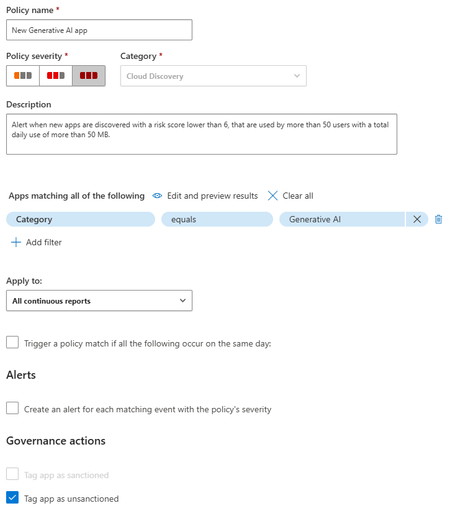

At the moment there is no setting to change the default behavior when Defender creates a URL indicator from a Cloud App governance action. When a Cloud Discovery policy automatically tags an app as Unsanctioned, Microsoft Defender creates the corresponding URL indicator and enables the “Generate alert” option by default. Unfortunately this behavior is currently hard-coded and there is no tenant-level configuration to disable it globally.
Because of that, SOC teams that use policies like yours (for example automatically unsanctioning all newly discovered apps in a category such as Generative AI) often end up with a large number of alerts when users attempt to access those apps.
Today the practical options are:
- Manually edit the indicator and disable Generate alert (which you already mentioned, but does not scale well).
- Use automation (Graph API, Power Automate, or a script) to periodically modify newly created indicators and turn off the alert flag.
- Adjust the SOC alert pipeline by filtering or suppressing these alerts if they are not actionable.
In many environments the goal of marking an app as Unsanctioned is simply to enforce blocking through Defender for Endpoint or network controls, not necessarily to generate alerts for every access attempt. Because of that, several organizations handle this by filtering those alerts in their SOC workflow.
Unfortunately, until Microsoft exposes a configurable option for indicator creation behavior, there is no native way to change this default in Defender.
 lfk73Mar 15, 2026Brass Contributor
I suspected that would be the case. I already have an automation in Sentinel to block alerts with "
Connection to a custom network indicator" to close which works but it also blocked other IOCs i have set that i might want to have the SOC review. Anyway to create an automation that detects if its also a specific Cloud App category? e.g. webmail.