microsoft defender for cloud apps
85 Topics
Unsanctioned cloud apps generates constant alerts
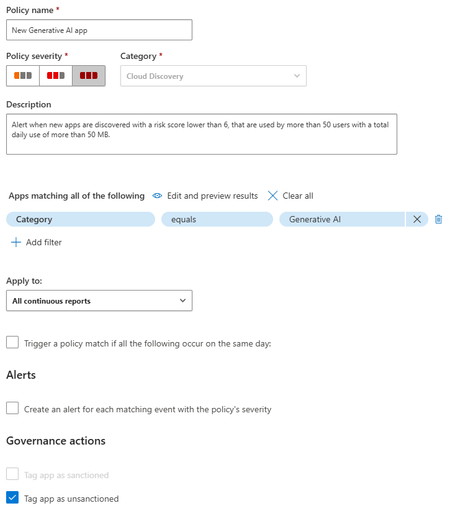
When I mark a cloud app as unsanctioned it created a URL based indicator to block the site. However, it also by default enables the Generate Alert option on the indictor. This causes my SOC to bet inundated with garbage alerts. Now normally if I'm just unsanctioning one Cloud App a could go and turn of the alert. However, I use cloud app policy that will identify any new Cloud Apps in an entire category and then unsanction it. But it enables Generate Alert on the URL indicator. Then if someone accesses that new one the generate alert kicks off. I don't want to have to go into every new app and untick generate alert manually that's just too time consuming. Is there a way to change the default behaviour when adding an indicator to not enable the generate alert? Of is there some other way to do this? I could consider using power automate or something but I'd rather the default behaviour be the fix as automation can break. I don't have time to babysit it.
From “No” to “Now”: A 7-Layer Strategy for Enterprise AI Safety
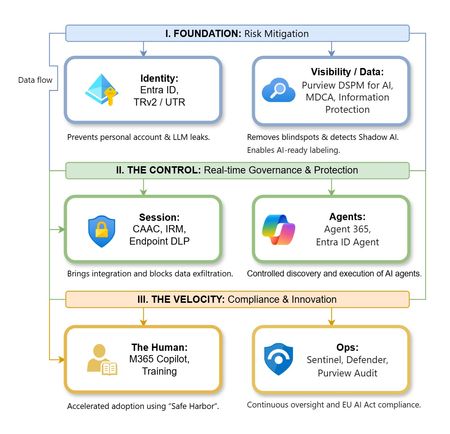
The “block” posture on Generative AI has failed. In a global enterprise, banning these tools doesn't stop usage; it simply pushes intellectual property into unmanaged channels and creates a massive visibility gap in corporate telemetry. The priority has now shifted from stopping AI to hardening the environment so that innovation can run at velocity without compromising data sovereignty. Traditional security perimeters are ineffective against the “slow bleed” of AI leakage - where data moves through prompts, clipboards, and autonomous agents rather than bulk file transfers. To secure this environment, a 7-layer defense-in-depth model is required to treat the conversation itself as the new perimeter. 1. Identity: The Only Verifiable Perimeter Identity is the primary control plane. Access to AI services must be treated with the same rigor as administrative access to core infrastructure. The strategy centers on enforcing device-bound Conditional Access, where access is strictly contingent on device health. To solve the "Account Leak" problem, the deployment of Tenant Restrictions v2 (TRv2) is essential to prevent users from signing into personal tenants using corporate-managed devices. For enhanced coverage, Universal Tenant Restrictions (UTR) via Global Secure Access (GSA) allows for consistent enforcement at the cloud edge. While TRv2 authentication-plane is GA, data-plane protection is GA for the Microsoft 365 admin center and remains in preview for other workloads such as SharePoint and Teams. 2. Eliminating the Visibility Gap (Shadow AI) You can’t secure what you can't see. Microsoft Defender for Cloud Apps (MDCA) serves to discover and govern the enterprise AI footprint, while Purview DSPM for AI (formerly AI Hub) monitors Copilot and third-party interactions. By categorizing tools using MDCA risk scores and compliance attributes, organizations can apply automated sanctioning decisions and enforce session controls for high-risk endpoints. 3. Data Hygiene: Hardening the “Work IQ” AI acts as a mirror of internal permissions. In a "flat" environment, AI acts like a search engine for your over-shared data. Hardening the foundation requires automated sensitivity labeling in Purview Information Protection. Identifying PII and proprietary code before assigning AI licenses ensures that labels travel with the data, preventing labeled content from being exfiltrated via prompts or unauthorized sharing. 4. Session Governance: Solving the “Clipboard Leak” The most common leak in 2025 is not a file upload; it’s a simple copy-paste action or a USB transfer. Deploying Conditional Access App Control (CAAC) via MDCA session policies allows sanctioned apps to function while specifically blocking cut/copy/paste. This is complemented by Endpoint DLP, which extends governance to the physical device level, preventing sensitive data from being moved to unmanaged USB storage or printers during an AI-assisted workflow. Purview Information Protection with IRM rounds this out by enforcing encryption and usage rights on the files themselves. When a user tries to print a "Do Not Print" document, Purview triggers an alert that flows into Microsoft Sentinel. This gives the SOC visibility into actual policy violations instead of them having to hunt through generic activity logs. 5. The “Agentic” Era: Agent 365 & Sharing Controls Now that we're moving from "Chat" to "Agents", Agent 365 and Entra Agent ID provide the necessary identity and control plane for autonomous entities. A quick tip: in large-scale tenants, default settings often present a governance risk. A critical first step is navigating to the Microsoft 365 admin center (Copilot > Agents) to disable the default “Anyone in organization” sharing option. Restricting agent creation and sharing to a validated security group is essential to prevent unvetted agent sprawl and ensure that only compliant agents are discoverable. 6. The Human Layer: “Safe Harbors” over Bans Security fails when it creates more friction than the risk it seeks to mitigate. Instead of an outright ban, investment in AI skilling-teaching users context minimization (redacting specifics before interacting with a model) - is the better path. Providing a sanctioned, enterprise-grade "Safe Harbor" like M365 Copilot offers a superior tool that naturally cuts down the use of Shadow AI. 7. Continuous Ops: Monitoring & Regulatory Audit Security is not a “set and forget” project, particularly with the EU AI Act on the horizon. Correlating AI interactions and DLP alerts in Microsoft Sentinel using Purview Audit (specifically the CopilotInteraction logs) data allows for real-time responses. Automated SOAR playbooks can then trigger protective actions - such as revoking an Agent ID - if an entity attempts to access sensitive HR or financial data. Final Thoughts Securing AI at scale is an architectural shift. By layering Identity, Session Governance, and Agentic Identity, AI moves from being a fragmented risk to a governed tool that actually works for the modern workplace.
New Blog | Identity hunting with an enhanced IdentityInfo table
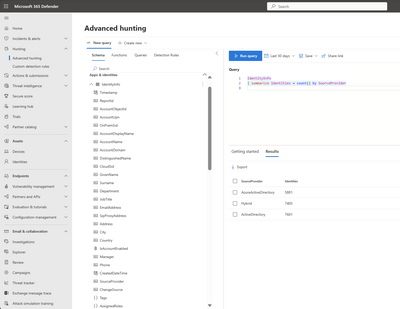
Advanced hunting with an enhanced IdentityInfo table Back in June 2023, we announced the enhanced IdentityInfo table in Microsoft 365 advanced hunting for Microsoft Defender for Identity customers. Today, we are expanding the availability of this table for all Microsoft defender for Cloud apps customers as part of our journey to enable this experience for all Microsoft 365 Defender customers. Read the full blog here: Identity hunting with an enhanced IdentityInfo table (microsoft.com)
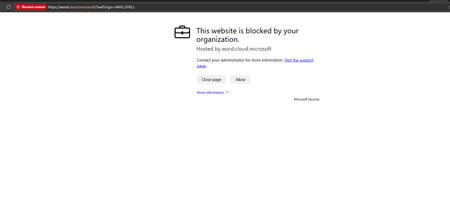
Change Defender SmartScreen warning screen if a user opens a website
Hello, We are currently exploring the possibility of modifying the display text in Defender SmartScreen when a user opens a potentially risky application. For instance, we are considering implementing this for chat.openai.com. When a user visits this website, we would like a message to appear, advising them not to share any company-related information on the site. The same approach would apply to other platforms like Deepl. Thank you for your assistance in this matter.SolvedNew|Microsoft Purview Data Loss Prevention: Announcing general availability of several capabilities
At Microsoft, we are committed to providing a unified and cloud-native solution that can help you prevent the loss of your sensitive data across your applications, services, and devices without the need to deploy and maintain costly infrastructure or agents. Microsoft Purview Data Loss Prevention (DLP) is an integrated, and extensible offering that allows organizations to manage their DLP policies from a single location and has a familiar user experience for both administrators and end-users. DLP is easy to turn on, doesn't require any agents and has protection built-in to Microsoft 365 cloud services, Office apps, Microsoft Edge (on Windows and Mac), and on endpoint devices. DLP controls can also be extended to the Chrome and Firefox browsers through the Microsoft Purview extension and to various non-Microsoft cloud apps such as Dropbox, Box, Google Drive, and others through the integration with Microsoft Defender for Cloud Apps. We are excited to announce the general availability of several capabilities in Microsoft Purview Data Loss Prevention that help organizations to increase their depth of protection, extend their protection capabilities to additional planes and platforms, as well as empower administrators to be efficient in their day-to-day tasks. Read the full blog here: Microsoft Purview Data Loss Prevention: Announcing general availability of several capabilities - Microsoft Community HubFound an oddity in Defender for Cloud Apps
I checked our Defender for Cloud Apps portal this morning, just looking around at different activity logs and queries. I found something odd. The activity shows usage on a mobile device, Apple iOS using MS Outlook, a creation of an email with attachments, both of which were in Kanji and Hanzi characters. This is not due to encoding as some were translated like "Please note that you should practice the customs of the process." as the email subject. Plus there were many files attached as well, some names translated. "Hirojozhi Jie" "Hirojozuke" The file extensions do not translate, unfortunately. User has confirmed that he did not create or send out emails from the mobile device. Investigation in Mail Explorer in Defender does not show the email as ever existing. I am considering it a spoof email. How do I verify it was a spoof? How is it that a spoof is listed in the cloud portal coming from a mobile device, that seems too specific.729Views0likes0CommentsDevice is showing as Non-Compliant when login from Chrome
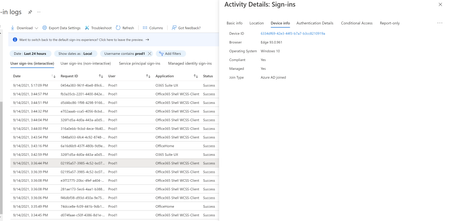
Hi All, I have created a Conditional access policy and session based access policy in MCAS to block download of sensitivity data from unmanaged device. everything is working fine when I login from Edge browser, but I concern is When I login from Chrome within Azure AD joined client that it's saying non-compliant. However When I login from Edge browser within same client, it will be showing as compliant in sign-in logs. appreciate the help! Thanks, DilanSolved7.9KViews0likes3Comments
A bug in the sign in with Security Key option for M365
1. Register a pair of keys in M365. 2. On a PC you are presented with an option to sign in with a security key! 3. On a MAC you are presented with an option to sign in with a security key! 4. On ChromeOS you are not presented with that option. ChromeOS supports FIDO2 and it works on many other sites. It is only M365 that has this issue. As a Partner I reached out to Microsoft support, who said Microsoft has dropped all support for ChromeOS. I do not expect to run Word on a Chromebook, but I can run the web version of any of Microsoft tools on a Chromebook. Why then, can I not have the same level of security on my account that I could if I was accessing the site on a PC or Mac? Microsoft should fix this bug if they really care about security of their customer's accounts, no matter how they access the site.
New blog post | A proactive and comprehensive approach to data security with Microsoft Purview Data
In today’s modern workplace data security incidents can happen any time as users collaborate on data across a myriad networks, devices, and applications. And the volume of data, people who interact with the data, and activities around the data are all constantly changing. All of this means that the data security risks are increasing exponentially, and many organizations are struggling to keep up given their limited resources. This comes at a time when a recent Microsoft study showed that two in five security leaders feel at extreme risk due to cybersecurity staff shortage [1]. Organizations are looking for a solution that can provide comprehensive coverage across apps and devices to address these risks and is also easy to deploy and manage. A proactive and comprehensive approach to data security with Microsoft Purview Data Loss Prevention - Microsoft Community Hub