microsoft defender for cloud apps
298 Topics
Microsoft Defender XDR / Defender for Endpoint data connectors inconsistent failures
Hello, We are deploying our SOC (Sentinel) environments via Bicep. Now the Defender XDR ( MicrosoftThreatProtection) and Defender for Endpoint ( MicrosoftDefenderAdvancedThreatProtection) data connectors are failing to deploy inconsistantly. It seems to be a known issue due to the following posts: - https://github.com/Azure/SimuLand/issues/23 - https://techcommunity.microsoft.com/t5/microsoft-sentinel/quot-missing-consent-invalid-license-quot-defender-for-endpoint/m-p/3027212 - https://github.com/Azure/Azure-Sentinel/issues/5007 Next to this issue I see almost no development on the data connectors API, is there some news to be spread how to enable data connectors automated in the future, since it seems to be moving to Content Hub. It is hard to find any docs about how to deploy this for example via Bicep!? Also I have a question regarding 'Tenant-based Microsoft Defender for Cloud (Preview)' data connector. We deploy this now via GenericUI data connector kind, but this has no option to enable it via automation. Same as the question in the previous paragraph, how would this be made possible?1.2KViews0likes1Comment
From “No” to “Now”: A 7-Layer Strategy for Enterprise AI Safety
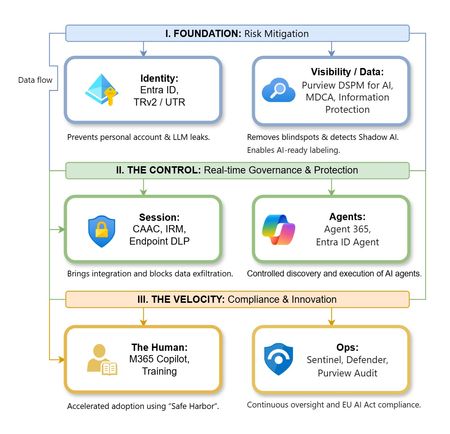
The “block” posture on Generative AI has failed. In a global enterprise, banning these tools doesn't stop usage; it simply pushes intellectual property into unmanaged channels and creates a massive visibility gap in corporate telemetry. The priority has now shifted from stopping AI to hardening the environment so that innovation can run at velocity without compromising data sovereignty. Traditional security perimeters are ineffective against the “slow bleed” of AI leakage - where data moves through prompts, clipboards, and autonomous agents rather than bulk file transfers. To secure this environment, a 7-layer defense-in-depth model is required to treat the conversation itself as the new perimeter. 1. Identity: The Only Verifiable Perimeter Identity is the primary control plane. Access to AI services must be treated with the same rigor as administrative access to core infrastructure. The strategy centers on enforcing device-bound Conditional Access, where access is strictly contingent on device health. To solve the "Account Leak" problem, the deployment of Tenant Restrictions v2 (TRv2) is essential to prevent users from signing into personal tenants using corporate-managed devices. For enhanced coverage, Universal Tenant Restrictions (UTR) via Global Secure Access (GSA) allows for consistent enforcement at the cloud edge. While TRv2 authentication-plane is GA, data-plane protection is GA for the Microsoft 365 admin center and remains in preview for other workloads such as SharePoint and Teams. 2. Eliminating the Visibility Gap (Shadow AI) You can’t secure what you can't see. Microsoft Defender for Cloud Apps (MDCA) serves to discover and govern the enterprise AI footprint, while Purview DSPM for AI (formerly AI Hub) monitors Copilot and third-party interactions. By categorizing tools using MDCA risk scores and compliance attributes, organizations can apply automated sanctioning decisions and enforce session controls for high-risk endpoints. 3. Data Hygiene: Hardening the “Work IQ” AI acts as a mirror of internal permissions. In a "flat" environment, AI acts like a search engine for your over-shared data. Hardening the foundation requires automated sensitivity labeling in Purview Information Protection. Identifying PII and proprietary code before assigning AI licenses ensures that labels travel with the data, preventing labeled content from being exfiltrated via prompts or unauthorized sharing. 4. Session Governance: Solving the “Clipboard Leak” The most common leak in 2025 is not a file upload; it’s a simple copy-paste action or a USB transfer. Deploying Conditional Access App Control (CAAC) via MDCA session policies allows sanctioned apps to function while specifically blocking cut/copy/paste. This is complemented by Endpoint DLP, which extends governance to the physical device level, preventing sensitive data from being moved to unmanaged USB storage or printers during an AI-assisted workflow. Purview Information Protection with IRM rounds this out by enforcing encryption and usage rights on the files themselves. When a user tries to print a "Do Not Print" document, Purview triggers an alert that flows into Microsoft Sentinel. This gives the SOC visibility into actual policy violations instead of them having to hunt through generic activity logs. 5. The “Agentic” Era: Agent 365 & Sharing Controls Now that we're moving from "Chat" to "Agents", Agent 365 and Entra Agent ID provide the necessary identity and control plane for autonomous entities. A quick tip: in large-scale tenants, default settings often present a governance risk. A critical first step is navigating to the Microsoft 365 admin center (Copilot > Agents) to disable the default “Anyone in organization” sharing option. Restricting agent creation and sharing to a validated security group is essential to prevent unvetted agent sprawl and ensure that only compliant agents are discoverable. 6. The Human Layer: “Safe Harbors” over Bans Security fails when it creates more friction than the risk it seeks to mitigate. Instead of an outright ban, investment in AI skilling-teaching users context minimization (redacting specifics before interacting with a model) - is the better path. Providing a sanctioned, enterprise-grade "Safe Harbor" like M365 Copilot offers a superior tool that naturally cuts down the use of Shadow AI. 7. Continuous Ops: Monitoring & Regulatory Audit Security is not a “set and forget” project, particularly with the EU AI Act on the horizon. Correlating AI interactions and DLP alerts in Microsoft Sentinel using Purview Audit (specifically the CopilotInteraction logs) data allows for real-time responses. Automated SOAR playbooks can then trigger protective actions - such as revoking an Agent ID - if an entity attempts to access sensitive HR or financial data. Final Thoughts Securing AI at scale is an architectural shift. By layering Identity, Session Governance, and Agentic Identity, AI moves from being a fragmented risk to a governed tool that actually works for the modern workplace.
Monitoring work from home
My boss has asked me if there is a way to see just how "busy" people who are working from home are. I have this data in Sentinel: Entra sign-in logs Defender for Endpoint logs Office 365 logs Most, if not all, on premise AD login events Netskope (current ZTNA solution) logs I have my known office location IPs so i could just exclude those and look for activity from other IPs however many times people will work in the morning or on the way to work appearing from a non corporate IP, come into the office appearing to come from a corporate IP, and then from home again in the evening. I need a way to query Sentinel looking for people who appear to be working but not coming from Corp IP. If they came from different IPs on the same day including Corp check to see if those non Corp are before and after business hours and exclude those. Anyone know of a good query to achieve this? Or maybe a tool that can extract and generate a report?211Views0likes0CommentsUnsanctioned cloud apps generates constant alerts
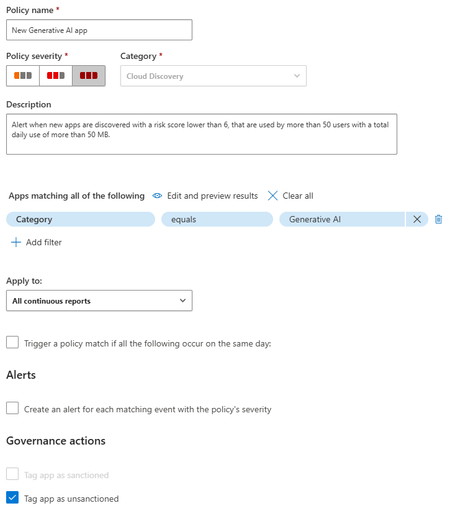
When I mark a cloud app as unsanctioned it created a URL based indicator to block the site. However, it also by default enables the Generate Alert option on the indictor. This causes my SOC to bet inundated with garbage alerts. Now normally if I'm just unsanctioning one Cloud App a could go and turn of the alert. However, I use cloud app policy that will identify any new Cloud Apps in an entire category and then unsanction it. But it enables Generate Alert on the URL indicator. Then if someone accesses that new one the generate alert kicks off. I don't want to have to go into every new app and untick generate alert manually that's just too time consuming. Is there a way to change the default behaviour when adding an indicator to not enable the generate alert? Of is there some other way to do this? I could consider using power automate or something but I'd rather the default behaviour be the fix as automation can break. I don't have time to babysit it.
Understand New Sentinel Pricing Model with Sentinel Data Lake Tier
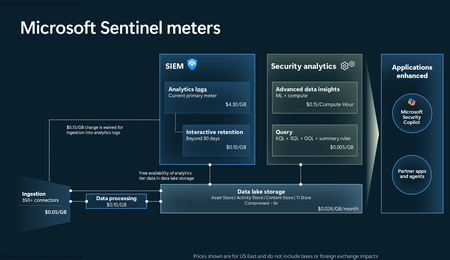
Introduction on Sentinel and its New Pricing Model Microsoft Sentinel is a cloud-native Security Information and Event Management (SIEM) and Security Orchestration, Automation, and Response (SOAR) platform that collects, analyzes, and correlates security data from across your environment to detect threats and automate response. Traditionally, Sentinel stored all ingested data in the Analytics tier (Log Analytics workspace), which is powerful but expensive for high-volume logs. To reduce cost and enable customers to retain all security data without compromise, Microsoft introduced a new dual-tier pricing model consisting of the Analytics tier and the Data Lake tier. The Analytics tier continues to support fast, real-time querying and analytics for core security scenarios, while the new Data Lake tier provides very low-cost storage for long-term retention and high-volume datasets. Customers can now choose where each data type lands—analytics for high-value detections and investigations, and data lake for large or archival types—allowing organizations to significantly lower cost while still retaining all their security data for analytics, compliance, and hunting. Please flow diagram depicts new sentinel pricing model: Now let's understand this new pricing model with below scenarios: Scenario 1A (PAY GO) Scenario 1B (Usage Commitment) Scenario 2 (Data Lake Tier Only) Scenario 1A (PAY GO) Requirement Suppose you need to ingest 10 GB of data per day, and you must retain that data for 2 years. However, you will only frequently use, query, and analyze the data for the first 6 months. Solution To optimize cost, you can ingest the data into the Analytics tier and retain it there for the first 6 months, where active querying and investigation happen. After that period, the remaining 18 months of retention can be shifted to the Data Lake tier, which provides low-cost storage for compliance and auditing needs. But you will be charged separately for data lake tier querying and analytics which depicted as Compute (D) in pricing flow diagram. Pricing Flow / Notes The first 10 GB/day ingested into the Analytics tier is free for 31 days under the Analytics logs plan. All data ingested into the Analytics tier is automatically mirrored to the Data Lake tier at no additional ingestion or retention cost. For the first 6 months, you pay only for Analytics tier ingestion and retention, excluding any free capacity. For the next 18 months, you pay only for Data Lake tier retention, which is significantly cheaper. Azure Pricing Calculator Equivalent Assuming no data is queried or analyzed during the 18-month Data Lake tier retention period: Although the Analytics tier retention is set to 6 months, the first 3 months of retention fall under the free retention limit, so retention charges apply only for the remaining 3 months of the analytics retention window. Azure pricing calculator will adjust accordingly. Scenario 1B (Usage Commitment) Now, suppose you are ingesting 100 GB per day. If you follow the same pay-as-you-go pricing model described above, your estimated cost would be approximately $15,204 per month. However, you can reduce this cost by choosing a Commitment Tier, where Analytics tier ingestion is billed at a discounted rate. Note that the discount applies only to Analytics tier ingestion—it does not apply to Analytics tier retention costs or to any Data Lake tier–related charges. Please refer to the pricing flow and the equivalent pricing calculator results shown below. Monthly cost savings: $15,204 – $11,184 = $4,020 per month Now the question is: What happens if your usage reaches 150 GB per day? Will the additional 50 GB be billed at the Pay-As-You-Go rate? No. The entire 150 GB/day will still be billed at the discounted rate associated with the 100 GB/day commitment tier bucket. Azure Pricing Calculator Equivalent (100 GB/ Day) Azure Pricing Calculator Equivalent (150 GB/ Day) Scenario 2 (Data Lake Tier Only) Requirement Suppose you need to store certain audit or compliance logs amounting to 10 GB per day. These logs are not used for querying, analytics, or investigations on a regular basis, but must be retained for 2 years as per your organization’s compliance or forensic policies. Solution Since these logs are not actively analyzed, you should avoid ingesting them into the Analytics tier, which is more expensive and optimized for active querying. Instead, send them directly to the Data Lake tier, where they can be retained cost-effectively for future audit, compliance, or forensic needs. Pricing Flow Because the data is ingested directly into the Data Lake tier, you pay both ingestion and retention costs there for the entire 2-year period. If, at any point in the future, you need to perform advanced analytics, querying, or search, you will incur additional compute charges, based on actual usage. Even with occasional compute charges, the cost remains significantly lower than storing the same data in the Analytics tier. Realized Savings Scenario Cost per Month Scenario 1: 10 GB/day in Analytics tier $1,520.40 Scenario 2: 10 GB/day directly into Data Lake tier $202.20 (without compute) $257.20 (with sample compute price) Savings with no compute activity: $1,520.40 – $202.20 = $1,318.20 per month Savings with some compute activity (sample value): $1,520.40 – $257.20 = $1,263.20 per month Azure calculator equivalent without compute Azure calculator equivalent with Sample Compute Conclusion The combination of the Analytics tier and the Data Lake tier in Microsoft Sentinel enables organizations to optimize cost based on how their security data is used. High-value logs that require frequent querying, real-time analytics, and investigation can be stored in the Analytics tier, which provides powerful search performance and built-in detection capabilities. At the same time, large-volume or infrequently accessed logs—such as audit, compliance, or long-term retention data—can be directed to the Data Lake tier, which offers dramatically lower storage and ingestion costs. Because all Analytics tier data is automatically mirrored to the Data Lake tier at no extra cost, customers can use the Analytics tier only for the period they actively query data, and rely on the Data Lake tier for the remaining retention. This tiered model allows different scenarios—active investigation, archival storage, compliance retention, or large-scale telemetry ingestion—to be handled at the most cost-effective layer, ultimately delivering substantial savings without sacrificing visibility, retention, or future analytical capabilities.Solved3.9KViews2likes6CommentsWelcome to the Microsoft Security Community!
We have moved! Registering for webinars is now easier than ever—you can add any session directly to your calendar with a single click using the link below. Please visit: https://securitycommunity.microsoft.com/VirtualEvents/ to sign up for future webinars!53KViews7likes13CommentsWhat’s new in Microsoft Defender XDR at Secure 2025
Protecting your organization against cybersecurity threats is more challenging than ever before. As part of our 2025 Microsoft Secure cybersecurity conference announcements, we’re sharing new product features that spotlight our AI-first, end-to-end security innovations designed to help - including autonomous AI agents in the Security Operations Center (SOC), as well as automatic detection and response capabilities. We also share information on how you can expand your protection by bringing data security and collaboration tools closer to the SOC. Read on to learn more about how these capabilities can help your organization stay ahead of today’s advanced threat actors. Expanding AI-Driven Capabilities for Smarter SOC Operations Introducing Microsoft Security Copilot’s Security Alert Triage Agent (previously named Phishing Triage Agent) Today, we are excited to introduce Security Copilot agents, a major step in bringing AI-driven automation to Microsoft Security solutions. As part of this, we’re unveiling our newest innovation in Microsoft Defender: the Security Alert Triage Agent. Acting as a force multiplier for SOC analysts, it streamlines the triage of user-submitted phishing incidents by autonomously identifying and resolving false positives, typically cleaning out over 95% of submissions. This allows teams to focus on the remaining incidents – those that pose the most critical threats. Phishing submissions are among the highest-volume alerts that security teams handle daily, and our data shows that at least 9 in 10 reported emails turn out to be harmless bulk mail or spam. As a result, security teams must sift through hundreds of these incidents weekly, often spending up to 30 minutes per case determining whether it represents a real threat. This manual triage effort not only adds operational strain but also delays the response to actual phishing attacks, potentially impacting protection levels. The Security Alert Triage Agent transforms this process by leveraging advanced LLM-driven analysis to conduct sophisticated assessments –such as examining the semantic content of emails– to autonomously determine whether an incident is a genuine phishing attempt or a false alarm. By intelligently cutting through the noise, the agent alleviates the burden on SOC teams, allowing them to focus on high-priority threats. Figure 1. A phishing incident triaged by the Security Copilot Security Alert Triage Agent To help analysts gain trust in its decision-making, the agent provides natural language explanations for its classifications, along with a visual representation of its reasoning process. This transparency enables security teams to understand why an incident was classified in a certain way, making it easier to validate verdicts. Analysts can also provide feedback in plain language, allowing the agent to learn from these interactions, refine its accuracy, and adapt to the organization’s unique threat landscape. Over time, this continuous feedback loop fine-tunes the agent’s behavior, aligning it more closely with organizational nuances and reducing the need for manual verification. The Security Copilot Security Alert Triage Agent is designed to transform SOC operations with autonomous, AI-driven capabilities. As phishing threats grow increasingly sophisticated and SOC analysts face mounting demands, this agent alleviates the burden of repetitive tasks, allowing teams to shift their focus to proactive security measures that strengthen the organization’s overall defense. Note: The Phishing Triage Agent has since been expanded and is now called the Security Alert Triage Agent. Learn more at aka.ms/SATA Security Copilot Enriched Incident Summaries and Suggested Prompts Security Copilot Incident Summaries in Microsoft Defender now feature key enrichments, including related threat intelligence and asset risk –enhancements driven by customer feedback. Additionally, we are introducing suggested prompts following incident summaries, giving analysts quick access to common follow-up questions for deeper context on devices, users, threat intelligence, and more. This marks a step towards a more interactive experience, moving beyond predefined inputs to a more dynamic, conversational workflow. Read more about Microsoft Security Copilot agent announcements here. New protection across Microsoft Defender XDR workloads To strengthen core protection across Microsoft Defender XDR workloads, we're introducing new capabilities while building upon existing integrations for enhanced protection. This ensures a more comprehensive and seamless defense against evolving threats. Introducing collaboration security for Microsoft Teams Email remains a prevalent entry point for attackers. But the fast adoption of collaboration tools like Microsoft Teams has opened new attack surfaces for cybercriminals. Our advancements within Defender for Office 365 allow organizations to continue to protect users in Microsoft Teams against phishing and other emerging cyberthreats with inline protection against malicious URLs, safe attachments, brand impersonation protection, and more. And to ensure seamless investigation and response at the incident level, everything is centralized across our SOC workflows in the unified security operations platform. Read the announcement here. Introducing Microsoft Purview Data Security Investigations for the SOC Understanding the extent of the data that has been impacted to better prioritize incidents has been a challenge for security teams. As data remains the main target for attackers it’s critical to dismantle silos between security and data security teams to enhance response times. At Microsoft, we’ve made significant investments in bringing SOC and data security teams closer together by integrating Microsoft Defender XDR and Microsoft Purview. We are continuing to build upon the rich set of capabilities and today, we are excited to announce that Microsoft Purview Data Security Investigations (DSI) can be initiated from the incident graph in Defender XDR. Ensuring robust data security within the SOC has always been important, as it helps protect sensitive information from breaches and unauthorized access. Data Security Investigations significantly accelerates the process of analyzing incident related data such as emails, files, and messages. With AI-powered deep content analysis, DSI reveals the key security and sensitive data risks. This integration allows analysts to further analyze the data involved in the incident, learn which data is at risk of compromise, and take action to respond and mitigate the incident faster, to keep the organization’s data protected. Read the announcement here. Figure 2. An incident that shows the ability to launch a data security investigation. OAuth app insights are now available in Exposure Management In recent years, we’ve witnessed a substantial surge in attackers exploiting OAuth applications to gain access to critical data in business applications like Microsoft Teams, SharePoint, and Outlook. To address this threat, Microsoft Defender for Cloud Apps is now integrating OAuth apps and their connections into Microsoft Security Exposure Management, enhancing both attack path and attack surface map experiences. Additionally, we are introducing a unified application inventory to consolidate all app interactions into a single location. This will address the following use cases: Visualize and remediate attack paths that attackers could potentially exploit using high-privilege OAuth apps to access M365 SaaS applications or sensitive Azure resources. Investigate OAuth applications and their connections to the broader ecosystem in Attack Surface Map and Advanced Hunting. Explore OAuth application characteristics and actionable insights to reduce risk from our new unified application inventory. Figure 3. An attack path infused with OAuth app insights Read the latest announcement here AI & TI are critical for effective detection & response To effectively combat emerging threats, AI has become critical in enabling faster detection and response. By combining this with the latest threat analytics, security teams can quickly pinpoint emerging risks and respond in real-time, providing organizations with proactive protection against sophisticated attacks. Disrupt more attacks with automatic attack disruption In this era of multi-stage, multi-domain attacks, the SOC need solutions that enable both speed and scale when responding to threats. That’s where automatic attack disruption comes in—a self-defense capability that dynamically pivots to anticipate and block an attacker’s next move using multi-domain signals, the latest TI, and AI models. We’ve made significant advancements in attack disruption, such as threat intelligence-based disruption announced at Ignite, expansion to OAuth apps, and more. Today, we are thrilled to share our next innovation in attack disruption—the ability to disrupt more attacks through a self-learning architecture that enables much earlier and much broader disruption. At its core, this technology monitors a vast array of signals, ranging from raw telemetry data to alerts and incidents across Extended Detection and Response (XDR) and Security Information and Event Management (SIEM) systems. This extensive range of data sources provides an unparalleled view of your security environment, helping to ensure potential threats do not go unnoticed. What sets this innovation apart is its ability learn from historical events and previously seen attack types to identify and disrupt new attacks. By recognizing similar patterns across data and stitching them together into a contextual sequence, it processes information through machine learning models and enables disruption to stop the attack much earlier in the attack sequence, stopping significantly more attacks in volume and variety. Comprehensive Threat Analytics are now available across all Threat Intelligence reports Organizations can now leverage the full suite of Threat Analytics features (related incidents, impacted assets, endpoints exposure, recommended actions) on all Microsoft Threat Intelligence reports. Previously only available for a limited set of threats, these features are now available for all threats Microsoft has published in Microsoft Defender Threat Intelligence (MDTI), offering comprehensive insights and actionable intelligence to help you ensure your security measures are robust and responsive. Some of these key features include: IOCs with historical hunting: Access IOCs after expiration to investigate past threats and aid in remediation and proactive hunting. MITRE TTPs: Build detections based on threat techniques, going beyond IOCs to block and alert on specific tactics. Targeted Industries: Filter threats by industry, aligning security efforts with sector-specific challenges. We’re proud of our new AI-first innovations that strengthen security protections for our customers and help us further our pledge to customers and our community to prioritize cyber safety above all else. Learn more about the innovations designed to help your organization protect data, defend against cyber threats, and stay compliant. Join Microsoft leaders online at Microsoft Secure on April 9. We hope you’ll also join us in San Francisco from April 27th-May 1 st 2025 at the RSA Conference 2025 to learn more. At the conference, we’ll share live, hands-on demos and theatre sessions all week at the Microsoft booth at Moscone Center. Secure your spot today.12KViews2likes1CommentWhy UK Enterprise Cybersecurity Is Failing in 2026 (And What Leaders Must Change)
Enterprise cybersecurity in large organisations has always been an asymmetric game. But with the rise of AI‑enabled cyber attacks, that imbalance has widened dramatically - particularly for UK and EMEA enterprises operating complex cloud, SaaS, and identity‑driven environments. Microsoft Threat Intelligence and Microsoft Defender Security Research have publicly reported a clear shift in how attackers operate: AI is now embedded across the entire attack lifecycle. Threat actors use AI to accelerate reconnaissance, generate highly targeted phishing at scale, automate infrastructure, and adapt tactics in real time - dramatically reducing the time required to move from initial access to business impact. In recent months, Microsoft has documented AI‑enabled phishing campaigns abusing legitimate authentication mechanisms, including OAuth and device‑code flows, to compromise enterprise accounts at scale. These attacks rely on automation, dynamic code generation, and highly personalised lures - not on exploiting traditional vulnerabilities or stealing passwords. The Reality Gap: Adaptive Attackers vs. Static Enterprise Defences Meanwhile, many UK enterprises still rely on legacy cybersecurity controls designed for a very different threat model - one rooted in a far more predictable world. This creates a dangerous "Resilience Gap." Here is why your current stack is failing- and the C-Suite strategy required to fix it. 1. The Failure of Traditional Antivirus in the AI Era Traditional antivirus (AV) relies on static signatures and hashes. It assumes malicious code remains identical across different targets. AI has rendered this assumption obsolete. Modern malware now uses automated mutation to generate unique code variants at execution time, and adapts behaviour based on its environment. Microsoft Threat Intelligence has observed threat actors using AI‑assisted tooling to rapidly rewrite payload components, ensuring that every deployment looks subtly different. In this model, there is no reliable signature to detect. By the time a pattern exists, the attacker has already moved on. Signature‑based detection is not just slow - it is structurally misaligned with AI‑driven attacks. The Risk: If your security relies on "recognising" a threat, you are already breached. By the time a signature exists, the attacker has evolved. The C-Suite Pivot: Shift investment from artifact detection to EDR/XDR (Extended Detection and Response). We must prioritise behavioural analytics and machine learning models that identify intent rather than file names. 2. Why Perimeter Firewalls Fail in a Cloud-First World Many UK enterprise still rely on firewalls enforcing static allow/deny rules based on IP addresses and ports. This model worked when applications were predictable and networks clearly segmented. Today, enterprise traffic is encrypted, cloud‑hosted, API‑driven, and deeply integrated with SaaS and identity services. AI‑assisted phishing campaigns abusing OAuth and device‑code flows demonstrate this clearly. From a network perspective, everything looks legitimate: HTTPS traffic to trusted identity providers. No suspicious port. No malicious domain. Yet the attacker successfully compromises identity. The Risk: Traditional firewalls are "blind" to identity-based breaches in cloud environments. The C-Suite Pivot: Move to Identity-First Security. Treat Identity as the new Control Plane, integrating signals like user risk, device health, and geolocation into every access decision. 3. The Critical Weakness of Single-Factor Authentication Despite clear NCSC guidance, single-factor passwords remain a common vulnerability in legacy applications and VPNs. AI-driven credential abuse has changed the economics of these attacks. Threat actors now deploy adaptive phishing campaigns that evolve in real-time. Microsoft has observed attackers using AI to hyper-target high-value UK identities- specifically CEOs, Finance Directors, and Procurement leads. The Risk: Static passwords are now the primary weak link in UK supply chain security. The C-Suite Pivot: Mandate Phishing‑resistant MFA (Passkeys or hardware security keys). Implement Conditional Access policies that evaluate risk dynamically at the moment of access, not just at login. Legacy Security vs. AI‑Era Reality 4. The Inherent Risk of VPN-Centric Security VPNs were built on a flawed assumption: that anyone "inside" the network is trustworthy. In 2026, this logic is a liability. AI-assisted attackers now use automation to map internal networks and identify escalation paths the moment they gain VPN access. Furthermore, Microsoft has tracked nation-state actors using AI to create synthetic employee identities- complete with fake resumes and deepfake communication. In these scenarios, VPN access isn't "hacked"; it is legally granted to a fraudster. The Risk: A compromised VPN gives an attacker the "keys to the kingdom." The C-Suite Pivot: Transition to Zero Trust Architecture (ZTA). Access must be explicit, scoped to the specific application, and continuously re‑evaluated using behavioural signals. 5. Data: The High-Velocity Target Sensitive data sitting unencrypted in legacy databases or backups is a ticking time bomb. In the AI era, data discovery is no longer a slow, manual process for a hacker. Attackers now use AI to instantly analyse your directory structures, classify your files, and prioritise high-value data for theft. Unencrypted data significantly increases your "blast radius," turning a containable incident into a catastrophic board-level crisis. The Risk: Beyond the technical breach, unencrypted data leads to massive UK GDPR fines and irreparable brand damage. The C-Suite Pivot: Adopt Data-Centric Security. Implement encryption by default, classify data while adding sensitivity labels and start board-level discussions regarding post‑quantum cryptography (PQC) to future-proof your most sensitive assets. 6. The Failure of Static IDS Traditional Intrusion Detection Systems (IDS) rely on known indicators of compromise - assuming attackers reuse the same tools and techniques. AI‑driven attacks deliberately avoid that assumption. Threat actors are now using Large Language Models (LLMs) to weaponize newly disclosed vulnerabilities within hours. While your team waits for a "known pattern" to be updated in your system, the attacker is already using a custom, AI-generated exploit. The Risk: Your team is defending against yesterday's news while the attacker is moving at machine speed. The C-Suite Pivot: Invest in Adaptive Threat Detection. Move toward Graph‑based XDR platforms that correlate signals across email, endpoint, and cloud to automate investigation and response before the damage spreads. From Static Security to Continuous Security Closing Thought: Security Is a Journey, Not a Destination For UK enterprises, the shift toward adaptive cybersecurity is no longer optional - it is increasingly driven by regulatory expectation, board oversight, and accountability for operational resilience. Recent UK cyber resilience reforms and evolving regulatory frameworks signal a clear direction of travel: cybersecurity is now a board‑level responsibility, not a back‑office technical concern. Directors and executive leaders are expected to demonstrate effective governance, risk ownership, and preparedness for cyber disruption - particularly as AI reshapes the threat landscape. AI is not a future cybersecurity problem. It is a current force multiplier for attackers, exposing the limits of legacy enterprise security architectures faster than many organisations are willing to admit. The uncomfortable truth for boards in 2026 is that no enterprise is 100% secure. Intrusions are inevitable. Credentials will be compromised. Controls will be tested. The difference between a resilient enterprise and a vulnerable one is not the absence of incidents, but how risk is managed when they occur. In mature organisations, this means assuming breach and designing for containment: Access controls that limit blast radius Least privilege and conditional access restricting attackers to the smallest possible scope if an identity is compromised Data‑centric security using automated classification and encryption, ensuring that even when access is misused, sensitive data cannot be freely exfiltrated As a Senior Enterprise Cybersecurity Architect, I see this moment as a unique opportunity. AI adoption does not have to repeat the mistakes of earlier technology waves, where innovation moved fast and security followed years later. We now have a rare chance to embed security from day one - designing identity controls, data boundaries, automated monitoring, and governance before AI systems become business‑critical. When security is built in upfront, enterprises don’t just reduce risk - they gain the confidence to move faster and unlock AI’s value safely. Security is no longer a “department”. In the age of AI, it is a continuous business function - essential to preserving trust and maintaining operational continuity as attackers move at machine speed. References: Inside an AI‑enabled device code phishing campaign | Microsoft Security Blog AI as tradecraft: How threat actors operationalize AI | Microsoft Security Blog Detecting and analyzing prompt abuse in AI tools | Microsoft Security Blog Post-Quantum Cryptography | CSRC Microsoft Digital Defense Report 2025 | Microsoft https://www.ncsc.gov.uk/news/government-adopt-passkey-technology-digital-servicesSecurity Copilot Skilling Series
Security Copilot joins forces with your favorite Microsoft Security products in a skilling series miles above the rest. The Security Copilot Skilling Series is your opportunity to strengthen your security posture through threat detection, incident response, and leveraging AI for security automation. These technical skilling sessions are delivered live by experts from our product engineering teams. Come ready to learn, engage with your peers, ask questions, and provide feedback. Upcoming sessions are noted below and will be available on-demand on the Microsoft Security Community YouTube channel. Coming Up Apr. 23 | Getting started with Security Copilot New to Security Copilot? This session walks through what you actually need to get started, including E5 inclusion requirements and a practical overview of the core experiences and agents you will use on day one. Apr. 28 | Security Copilot Agents, DSPM AI Observability, and IRM for Agents This session covers an overview of how Microsoft Purview supports AI risk visibility and investigation through Data Security Posture Management (DSPM) and Insider Risk Management (IRM), alongside Security Copilot–powered agents. This session will go over what is AI Observability in DSPM as well as IRM for Agents in Copilot Studio and Azure AI Foundry. Attendees will learn about the IRM Triage Agent and DSPM Posture Agent and their deployment. Attendees will gain an understanding of how DSPM and IRM capabilities could be leveraged to improve visibility, context, and response for AI-related data risks in Microsoft Purview. Now On-Demand Apr. 2 | Current capabilities of Copilot in Intune Speakers: Amit Ghodke and Carlos Brito This session on Copilot in Intune & Agents explores the current embedded Copilot experiences and AI‑powered agents available through Security Copilot in Microsoft Intune. Attendees will learn how these capabilities streamline administrative workflows, reduce manual effort, and accelerate everyday endpoint management tasks, helping organizations modernize how they operate and manage devices at scale. March 5 | Conditional Access Optimization Agent: What It Is & Why It Matters Speaker: Jordan Dahl Get a clear, practical look at the Conditional Access Optimization Agent—how it automates policy upkeep, simplifies operations, and uses new post‑Ignite updates like Agent Identity and dashboards to deliver smarter, standards‑aligned recommendations. February 19 | Agents That Actually Work: From an MVP Speaker: Ugur Koc, Microsoft MVP Microsoft MVP Ugur Koc will share a real-world workflow for building agents in Security Copilot, showing how to move from an initial idea to a consistently performing agent. The session highlights how to iterate on objectives, tighten instructions, select the right tools, and diagnose where agents break or drift from expected behavior. Attendees will see practical testing and validation techniques, including how to review agent decisions and fine-tune based on evidence rather than intuition to help determine whether an agent is production ready. February 5 | Identity Risk Management in Microsoft Entra Speaker: Marilee Turscak Identity teams face a constant stream of risky user signals, and determining which threats require action can be time‑consuming. This webinar explores the Identity Risk Management Agent in Microsoft Entra, powered by Security Copilot, and how it continuously monitors risky identities, analyzes correlated sign‑in and behavior signals, and explains why a user is considered risky. Attendees will see how the agent provides guided remediation recommendations—such as password resets or risk dismissal—at scale and supports natural‑language interaction for faster investigations. The session also covers how the agent learns from administrator instructions to apply consistent, policy‑aligned responses over time. January 28 | Security Copilot in Purview Technical Deep Dive Speakers: Patrick David, Thao Phan, Alexandra Roland Discover how AI-powered alert triage agents for Data Loss Prevention (DLP) and Insider Risk Management (IRM) are transforming incident response and compliance workflows. Explore new Data Security Posture Management (DSPM) capabilities that deliver deeper insights and automation to strengthen your security posture. This session will showcase real-world scenarios and actionable strategies to help you protect sensitive data and simplify compliance. January 22 | Security Copilot Skilling Series | Building Custom Agents: Unlocking Context, Automation, and Scale Speakers: Innocent Wafula, Sean Wesonga, and Sebuh Haileleul Microsoft Security Copilot already features a robust ecosystem of first-party and partner-built agents, but some scenarios require solutions tailored to your organization’s specific needs and context. In this session, you'll learn how the Security Copilot agent builder platform and MCP servers empower you to create tailored agents that provide context-aware reasoning and enterprise-scale solutions for your unique scenarios. December 18 | What's New in Security Copilot for Defender Speaker: Doug Helton Discover the latest innovations in Microsoft Security Copilot embedded in Defender that are transforming how organizations detect, investigate, and respond to threats. This session will showcase powerful new capabilities—like AI-driven incident response, contextual insights, and automated workflows—that help security teams stop attacks faster and simplify operations. Why Attend: Stay Ahead of Threats: Learn how cutting-edge AI features accelerate detection and remediation. Boost Efficiency: See how automation reduces manual effort and improves SOC productivity. Get Expert Insights: Hear directly from product leaders and explore real-world use cases. Don’t miss this opportunity to future-proof your security strategy and unlock the full potential of Security Copilot in Defender! December 4 | Discussion of Ignite Announcements Speakers: Zineb Takafi, Mike Danoski and Oluchi Chukwunwere, Priyanka Tyagi, Diana Vicezar, Thao Phan, Alex Roland, and Doug Helton Ignite 2025 is all about driving impact in the era of AI—and security is at the center of it. In this session, we’ll unpack the biggest Security Copilot announcements from Ignite on agents and discuss how Copilot capabilities across Intune, Entra, Purview, and Defender deliver end-to-end protection. November 13 | Microsoft Entra AI: Unlocking Identity Intelligence with Security Copilot Skills and Agents Speakers: Mamta Kumar, Sr. Product Manager; Margaret Garcia Fani, Sr. Product Manager This session will demonstrate how Security Copilot in Microsoft Entra transforms identity security by introducing intelligent, autonomous capabilities that streamline operations and elevate protection. Customers will discover how to leverage AI-driven tools to optimize conditional access, automate access reviews, and proactively manage identity and application risks - empowering them into a more secure, and efficient digital future. October 30 | What's New in Copilot in Microsoft Intune Speaker: Amit Ghodke, Principal PM Architect, CxE CAT MEM Join us to learn about the latest Security Copilot capabilities in Microsoft Intune. We will discuss what's new and how you can supercharge your endpoint management experience with the new AI capabilities in Intune. October 16 | What’s New in Copilot in Microsoft Purview Speaker: Patrick David, Principal Product Manager, CxE CAT Compliance Join us for an insider’s look at the latest innovations in Microsoft Purview —where alert triage agents for DLP and IRM are transforming how we respond to sensitive data risks and improve investigation depth and speed. We’ll also dive into powerful new capabilities in Data Security Posture Management (DSPM) with Security Copilot, designed to supercharge your security insights and automation. Whether you're driving compliance or defending data, this session will give you the edge. October 9 | When to Use Logic Apps vs. Security Copilot Agents Speaker: Shiv Patel, Sr. Product Manager, Security Copilot Explore how to scale automation in security operations by comparing the use cases and capabilities of Logic Apps and Security Copilot Agents. This webinar highlights when to leverage Logic Apps for orchestrated workflows and when Security Copilot Agents offer more adaptive, AI-driven responses to complex security scenarios. All sessions will be published to the Microsoft Security Community YouTube channel - Security Copilot Skilling Series Playlist __________________________________________________________________________________________________________________________________________________________________ Looking for more? Keep up on the latest information on the Security Copilot Blog. Join the Microsoft Security Community mailing list to stay up to date on the latest product news and events. Engage with your peers one of our Microsoft Security discussion spaces.4.4KViews1like0CommentsAnnouncing public preview of custom graphs in Microsoft Sentinel
Security attacks span identities, devices, resources, and activity, making it critical to understand how these elements connect to expose real risk. In November, we shared how Sentinel graph brings these signals together into a relationship-aware view to help uncover hidden security risks. We’re excited to announce the public preview of custom graphs in Sentinel, available starting April 1 st . Custom graphs let defenders model relationships that are unique to their organization, then run graph analytics to surface blast radius, attack paths, privilege chains, chokepoints, and anomalies that are difficult to spot in tables alone. In this post, we’ll cover what custom graphs are, how they work, and how to get started so the entire team can use them. Custom graphs Security data is inherently connected: a sign-in leads to a token, a token touches a workload, a workload accesses data, and data movement triggers new activity. Graphs represent these relationships as nodes (entities) and edges (relationships), helping you answer questions like: “Who received the phishing email, who clicked, and which clicks were allowed by the proxy?” or “Show me users who exported notebooks, staged files in storage, then uploaded data to personal cloud storage- the full, three‑phase exfiltration chain through one identity.” With custom graphs, security teams can build, query, and visualize tailored security graphs using data from the Sentinel data lake and non-Microsoft sources, powered by Fabric. By uncovering hidden patterns and attack paths, graphs provide the relationship context needed to surface real risk. This context strengthens AI‑powered agent experiences, speeds investigations, clarifies blast radius, and helps teams move from noisy, disconnected alerts to confident decisions. In the words of our preview customers: “We ingested our Databricks management-plane telemetry into the Sentinel data lake and built a custom security graph. Without writing a single detection rule, the graph surfaced unusual patterns of activity and overprivileged access that we escalated for investigation. We didn't know what we were looking for, the graph surfaced the risk for us by revealing anomalous activity patterns and unusual access combinations driven by relationships, not alerts.” – SVP, Security Solutions | Financial Services organization Use cases Sentinel graph offers embedded, Microsoft managed, security graphs in Defender and Microsoft Purview experiences to help you at every stage of defense, from pre-breach to post-breach and across assets, activities, and threat intelligence. See here for more details. The new custom graph capability gives you full control to create your own graphs combining data from Microsoft sources, non-Microsoft sources, and federated sources in the Sentinel data lake. With custom graphs you can: Understand blast radius – Trace phishing campaigns, malware spread, OAuth abuse, or privilege escalation paths across identities, devices, apps, and data, without stitching together dozens of tables. Reconstruct real attack chains – Model multi-step attacker behavior (MITRE techniques, lateral movement, before/after malware) as connected sequences so investigations are complete and explainable, not a set of partial pivots. Reconstruct these chains from historical data in the Sentinel data lake. Figure 2: Drill into which specific MITRE techniques each IP is executing and in which tactic category Spot hidden risks and anomalies – Detect structural outliers like users with unusually broad access, anomalous email exfiltration, or dangerous permission combinations that are invisible in flat logs. Figure 3: OAuth consent chain – a single compromised user consented four dangerous permissions Creating custom graph Using the Sentinel VS Code extension, you can generate graphs to validate hunting hypotheses, such as understanding attack paths and blast radius of a phishing campaign, reconstructing multi‑step attack chains, and identifying structurally unusual or high‑risk behavior, making it accessible to your team and AI agents. Once persisted via a schedule job, you can access these custom graphs from the ready-to-use section in the graphs section in the Defender portal. Figure 4: Use AI-assisted vibe coding in Visual Studio Code to create tailored security graphs powered by Sentinel data lake and Fabric Graphs experience in the Microsoft Defender portal After creating your custom graphs, you can access them in the Graphs section of the Microsoft Defender portal under Sentinel. From there, you can perform interactive, graph-based investigations, for example, using a graph built for phishing analysis to quickly evaluate the impact of a recent incident, profile the attacker, and trace paths across Microsoft telemetry and third-party data. The graph experience lets you run Graph Query Language (GQL) queries, view the graph schema, visualize results, see results in a table, and interactively traverse to the next hop with a single click. Figure 5: Query, visualize, and traverse custom graphs with the new graph experience in Sentinel Billing Custom graph API usage for creating graph and querying graph is billed according to the Sentinel graph meter. Get started To use custom graphs, you’ll need Microsoft Sentinel data lake enabled in your tenant, since the lake provides the scalable, open-format foundation that custom graphs build on. Use the Sentinel data lake onboarding flow to provision the data lake if it isn’t already enabled. Ensure the required connectors are configured to populate your data lake. See Manage data tiers and retention in Microsoft Sentinel | Microsoft Learn. Create and persist a custom graph. See Get started with custom graphs in Microsoft Sentinel (preview) | Microsoft Learn. Run adhoc graph queries and visualize graph results. See Visualize custom graphs in Microsoft Sentinel graph (preview) | Microsoft Learn. [Optional] Schedule jobs to write graph query results to the lake tier and analytics tier using notebooks. See Exploring and interacting with lake data using Jupyter Notebooks - Microsoft Security | Microsoft Learn. Learn more Earlier posts (Sentinel graph general availability) RSAC 2026 announcement roundup Custom graphs documentation Custom graph billing