Forum Discussion

Why our users are getting local admin access on devices when the device runs through Autopilot profi
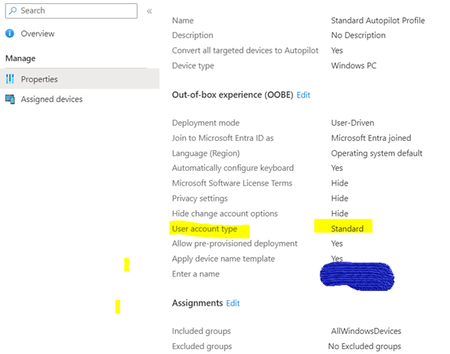

999 of the 1000 times its just that those devices didn't got the Autopilot profile 🙂
Can you confirm if those newly wiped enrolled devices do have applied the device name template?
Besides that autopilot profile, its always a smart thing to do to have a backup solution in place for when the user would still be admin..
https://call4cloud.nl/2021/04/dude-wheres-my-admin/ (which also has a link to this one)
https://call4cloud.nl/2020/03/remove-all-local-admins/
But again... first make sure they did receive the profile 🙂

Where I can check whether it has the template assigned on it as I have seen devices being enrolled via Autopilot profile and added in all the locations like Intune, Autopilot, Entra ID and Defender as well but this is what happening.
- Nov 01, 20231. Check if the profile is assigned to the devices
https://learn.microsoft.com/en-us/autopilot/profiles
If the device is enrolled and the user isn't a regular user but admin... check if the device also has the same naming template you configured in the same autopilot profile. If the device didn't got the autopilot profile (due a lot of possible reasons) the user isn't admin and the device still has the old name- VinodS2020Nov 01, 2023Brass Contributor
Here is says this
And name templates but in our case we kept few characters - and device serial number but it works when device goes through OOBE via Autopilot and not the Entra ID joined method
- Nov 01, 2023Yep… thats why i mentioned it… autopilot is just nothing more than streamlining thr enrollment… (a bit more but to make it clear) the device needs to go through the oobe to enroll with autopilot … at that point the autopilot profile will be downloaded and applied . This will not happen with a regular entra join