Forum Discussion

_PRyan
Jul 23, 2020Brass Contributor
Using EnterpriseExtFileSystem CSP to Deliver File to Windows 10 Mobile Device
I am attempting to deliver a file to my Windows 10 IoT Enterprise device using a custom Configuration profile. I am trying to follow the https://docs.microsoft.com/en-us/windows/client-management/mdm...
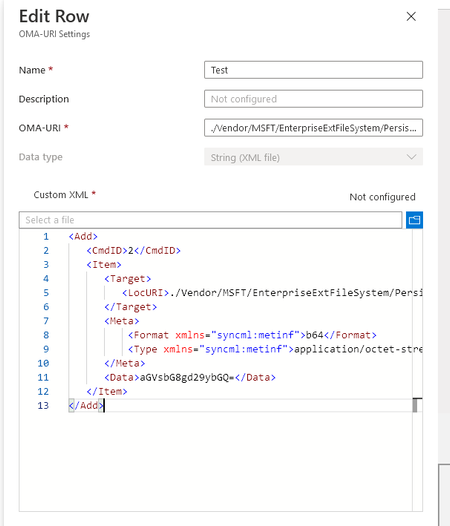
- Jul 24, 2020
I was finally able to get it to work. I changed the .txt file containing the Base64 encoded data to a .bin file and uploaded that under the Base64(File) data type. The file delivered and was converted back to the plain text where the device could read the scanner settings. I would like to thank you for talking this through with me! Much Appreciated!


Lewis-H
Jul 24, 2020Iron Contributor
File contents are embedded directly into the syncML message, so there is a limit to the size of the file that can be retrieved from the device. The default limit is 0x100000 (1 MB). You can configure this limit by using the following registry key: Software\Microsoft\Provisioning\CSPs\.\Vendor\MSFT\EnterpriseExtFileSystem\MaxFileReadSize.
The following diagram shows the EnterpriseExtFileSystem configuration service provider in tree format as used by the Open Mobile Alliance (OMA) Device Management (DM).
enterpriseextfilesystem csp
The following list describes the characteristics and parameters.
./Vendor/MSFT/EnterpriseExtFileSystem
The root node for the EnterpriseExtFileSystem configuration service provider. Supported operations are Add and Get.
The following diagram shows the EnterpriseExtFileSystem configuration service provider in tree format as used by the Open Mobile Alliance (OMA) Device Management (DM).
enterpriseextfilesystem csp
The following list describes the characteristics and parameters.
./Vendor/MSFT/EnterpriseExtFileSystem
The root node for the EnterpriseExtFileSystem configuration service provider. Supported operations are Add and Get.