Forum Discussion

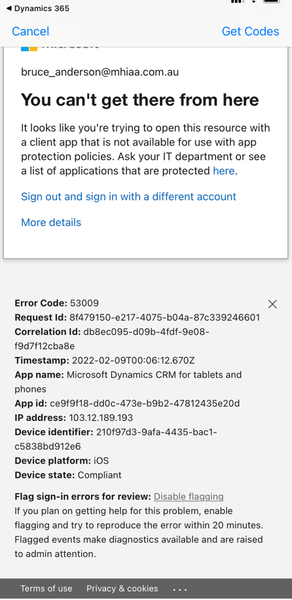
Unable to log into Dynamics 365 for Phones due to App Protectin Policy Error
- Feb 17, 2022
I see the issue now.
It’s not recommended to include all apps in the conditional access, this means any app (even other than o365 apps) will have the same issue as Dynamic because the app is not in the approved list.
I used to think the issue is from the app protection policy but now I can confirm it’s from CA. You need include Office Apps not all the cloud apps.
Check my screenshot.
Moe


Se attached. I have confirmed the app is under neither. And also had tried to add an exclusion for it in the CA however it doesn't come up in the search results.


I see the issue now.
It’s not recommended to include all apps in the conditional access, this means any app (even other than o365 apps) will have the same issue as Dynamic because the app is not in the approved list.
I used to think the issue is from the app protection policy but now I can confirm it’s from CA. You need include Office Apps not all the cloud apps.
Check my screenshot.
Moe
- asmilie2bFeb 21, 2022Tin Contributor
So while it was working on Friday, it no longer is. Which is bizarre. I still only have Office 365 selected under the cloud apps. No other changes were made. I am sure now it is something in the CA, because when I disable the main policy, it works again.
- asmilie2bFeb 17, 2022Tin ContributorWell, that seems to have done it! I guess it makes sense, perhaps the app is just a shell for the cloud service.. and falls into the Cloud Apps category... I have now added only the Microsoft Office 365 app in there, done a sync, and now the app loads. So much thanks for your help!