Forum Discussion

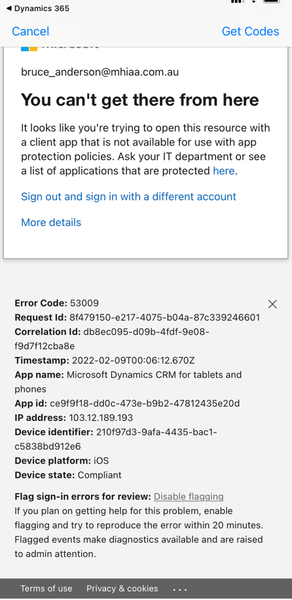
Unable to log into Dynamics 365 for Phones due to App Protectin Policy Error
- Feb 17, 2022
I see the issue now.
It’s not recommended to include all apps in the conditional access, this means any app (even other than o365 apps) will have the same issue as Dynamic because the app is not in the approved list.
I used to think the issue is from the app protection policy but now I can confirm it’s from CA. You need include Office Apps not all the cloud apps.
Check my screenshot.
Moe


- Moe_KinaniFeb 15, 2022Bronze Contributor
Got it. Do you see the app in the screenshot attached? If not, it means not supported.
Removing an app from app protection policy could take time up to 48 hours to reflect the new change.- Moe_KinaniFeb 15, 2022Bronze Contributor
Are you using the app below? These ones are not supported.
https://apps.apple.com/us/app/dynamics-365-for-phones/id1003997947https://apps.apple.com/us/app/dynamics-365-sales/id1485578688
This one is supported:
https://apps.apple.com/us/app/microsoft-dynamics-365/id678800460
Hope it helps!
Moe- asmilie2bFeb 15, 2022Copper ContributorThat I can do. We are pretty new to Intune, so was not sure how quick things take effect. I was able to remove the "ghost" entry for the app in my first post above, so maybe that shakes things up. Will give it some time, thank you for the assistance!
