Forum Discussion

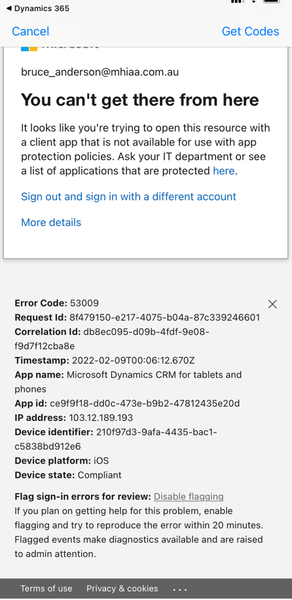
Unable to log into Dynamics 365 for Phones due to App Protectin Policy Error
- Feb 17, 2022
I see the issue now.
It’s not recommended to include all apps in the conditional access, this means any app (even other than o365 apps) will have the same issue as Dynamic because the app is not in the approved list.
I used to think the issue is from the app protection policy but now I can confirm it’s from CA. You need include Office Apps not all the cloud apps.
Check my screenshot.
Moe


To me, this error is coming from Conditional Access, do you have approved apps and CA policy? If yes, is the device registered to Azure AD using Broker app?
Dynamic 365 is one of the approved apps so it should work in your policy.
Moe
From MSFT docs:
Require app protection policy
In your Conditional Access policy, you can require an Intune app protection policy be present on the client app before access is available to the selected cloud apps.
In order to apply this grant control, Conditional Access requires that the device is registered in Azure Active Directory, which requires the use of a broker app. The broker app can be either the Microsoft Authenticator for iOS, or the Microsoft Company portal for Android devices. If a broker app isn’t installed on the device when the user attempts to authenticate, the user gets redirected to the app store to install the broker app.
https://docs.microsoft.com/en-us/azure/active-directory/conditional-access/concept-conditional-access-grant
 asmilie2bFeb 15, 2022Tin Contributor
Many thanks for the reply.
I had taken the app out of App Prtection policy just to try and get it working (and confirm if the issue was indeed InTune related). So now I have placed it back in there, and the same issue continues. I confirm that we are testing on devices which have both the MS Authenticator App, and also the InTune Company Portal app installed. And they both show the devices are enrolled successfully.
- Moe_KinaniFeb 15, 2022Bronze ContributorDo you have other apps in the policy? Do you have the access error only in Dynamic app or other apps as well?
- asmilie2bFeb 15, 2022Tin ContributorYes we do have other apps in the policy. Outlook, Teams, Dynamics NAV, Office, etc. All of the other apps are running fine. Which is why I wondered if Dynamics 365 for Phones (AKA Microsoft CRM or Dynamics 365 for Sales) is not supported with App Protection.