Forum Discussion

David-B
Nov 20, 2020Copper Contributor
Trying to learn Intune - stuck at MDM "Your device is already being manged by an organization"
I'm trying to learn Intune and Endpoint manager so I'm going through the Pluralsight course https://app.pluralsight.com/paths/skills/implementing-mobile-device-management-mdm-with-microsoft-intune by...
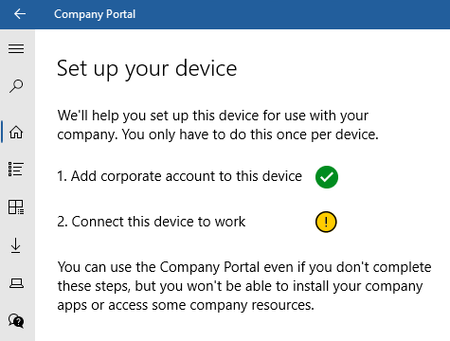
- Nov 23, 2020
The issue has been resolved. The default configuration was for MAM user scope to be set to All when it needs to be set to None.
To get to the correct screen, go to Microsoft Endpoint Manager, click Devices, Enroll Devices, click Automatic Enrollment. Changing MAM from All to None, unmanaging the devices currently in AAD, then adding them again via the Company Portal store app.


Hacksawcats
Oct 12, 2022Copper Contributor
Hi Rudy,
Thanks for the reply. Sorry if I'm being thick but when you say "intune enrollment" do you mean "company portal" or "endpoint manager" ?
Regards
Thanks for the reply. Sorry if I'm being thick but when you say "intune enrollment" do you mean "company portal" or "endpoint manager" ?
Regards

Oct 12, 2022
Endpoint Manager / Intune Portal --> Devices --> Enroll devices --> Below Windows Autopilot Deployment Program --> devices
- HacksawcatsOct 13, 2022Copper ContributorHi Rudy, Sorry to trouble you again, but can you just clarify for me: In your post you mentioned "endpoint manager/Intune portal" I appreciate this sounds like a dumb question, but I'm late to the party here! Is Intune now a part of endpoint as I don't see an option for the Intune portal when I launch endpoint manager. Or are they two different MDM Solutions? The other thing is I'm new to the post and don't have much experience with endpoint manager. The company is running a hybrid AD (on premises and AAD). I get that AAD syncs with on premise and that's how it imports the device. But I can't seem to get the device to enroll into endpoint. I've been left some instructions from the previous IT guy and those instructions are:
3 – Install Intune on local admin account before domain joining.
Open Microsoft store and search for company portal
4 – sign in with user credentials on Intune. Make sure allow org to manage device is ticked.
So, when he says, "Install Intune" he means "company portal"?
Point 3: He also mentions "Install Intune (company portal?) with local admin account before domain joining the domain" Do you know the reason for this?
Point 4: He mentions that the "user" I guess end user? has to sign into the company portal app and then the end user has to go through the rest of the setup?
Once this has been done, I then have to join/rejoin it to the domain?
I have followed the instructions to the letter but keep getting various error messages and don't seem to be making any progress! AM I missing something? Any advice you could offer would be gratefully appreciated.
Regards - HacksawcatsOct 12, 2022Copper ContributorThanks Rudy, you're a star 🙂