Forum Discussion

Turn on Memory Integrity via Intune


rahuljindal
Yes, I did.
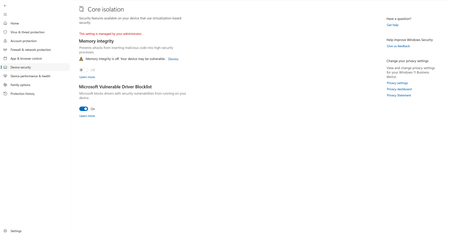
I have Memory Integrity turned ON for me.
And these are the registry values for me:
PS C:\WINDOWS\system32> Get-ItemProperty -Path Registry::\HKEY_LOCAL_MACHINE\SYSTEM\CurrentControlSet\Control\DeviceGuard\Scenarios\HypervisorEnforcedCodeIntegrity
Enabled : 1
HVCIMATRequired : 0
Locked : 1
PSPath : Microsoft.PowerShell.Core\Registry::\HKEY_LOCAL_MACHINE\SYSTEM\CurrentControlSet\Control\DeviceGuard\Scenarios\HypervisorEnforcedCodeIntegrity
PSParentPath : Microsoft.PowerShell.Core\Registry::\HKEY_LOCAL_MACHINE\SYSTEM\CurrentControlSet\Control\DeviceGuard\Scenarios
PSChildName : HypervisorEnforcedCodeIntegrity
PSProvider : Microsoft.PowerShell.Core\Registry
And, this is the registry value for the user where it is not turned ON using my script:
PS C:\Users\XX> Get-ItemProperty -Path Registry::\HKEY_LOCAL_MACHINE\SYSTEM\CurrentControlSet\Control\DeviceGuard\Scenarios\HypervisorEnforcedCodeIntegrity
Enabled : 1
PSPath : Microsoft.PowerShell.Core\Registry::\HKEY_LOCAL_MACHINE\SYSTEM\CurrentControlSet\Control\DeviceGuard\Scenarios\HypervisorEnforcedCodeIntegrity
PSParentPath : Microsoft.PowerShell.Core\Registry::\HKEY_LOCAL_MACHINE\SYSTEM\CurrentControlSet\Control\DeviceGuard\Scenarios
PSChildName : HypervisorEnforcedCodeIntegrity
PSProvider : Microsoft.PowerShell.Core\Registry
How can I have the registry value same as me for the users where it is not turned ON.