Forum Discussion

Platform SSO for macOS not working
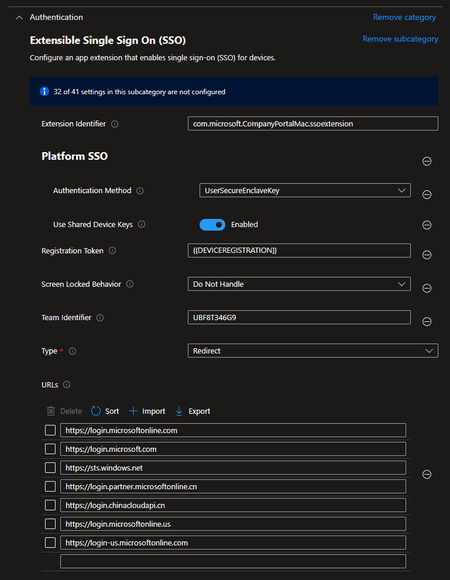

First of all, thanks to PatrickF11 for the URL solution.
Hello good
After a week of dealing with the password synchronization issue on the local MacOS account, I found the solution to have the Mac sync the ID password. I modified the following parameter:
Authentication Method: UserSecureEnclaveKey to Password
After changing the option on the Mac, I went to:
Users & Groups > Network Account Server and clicked on Repair to re-register the device. Then, the notification appeared, and I registered the password synchronization. Now, it is synchronized correctly.

In my understanding:
Password is only a thing to make the user experience a little better by keeping the entra id and the local password in sync, so the user only need to remember one password.
Secure Enclave instead is a feature like Windows Hello for Business, so some kind of passwordless authentication which is respected by entra mfa.
Are there any other thoughts regarding my estimation?
- nhtkidAug 29, 2024Iron Contributor
Hi PatrickF11 you are absolutely right.
Secure Enclave is considered the most secure, advanced passwordless authentication method that MS offered for Mac. However, I don't use it.
Secure Enclave will leave you with a local password. Unlike WHfB, when users forget the PIN, they can still log in using Entra password as a backup, if users forget the local password for Secure Enclave, they cannot log in. It's not like a password admin could help users to reset via Entra or ABM.
I don't know how you can work around this issue. If you do, please let me know coz I do like to use Secure Enclave.
On the other hand, "Password" authentication syncs the local password with Entra so you don't have this issue. It's no better than the old school NoMAD setup, but the process is definitely simpler and seamless with MS.
- cblascobonAug 27, 2024Copper Contributor
Thank you for the clarification PatrickF11
I understand the concept. In my case, I need the user to have their password synchronized in order to access certain servers.
As you mentioned, Secure Enclave Mode is an additional layer of security to consider.
- DanEngelsmeierAug 26, 2024Brass ContributorYou do make a good point. I liked the concept of Secure Enclave Mode. Since I initially thought that the process was going to create a 2nd user account based on the Entra ID account, which it does not, and I've used the scripting advice to address creating an admin user account for myself and downgrading the created user account to standard, I think I might switch back to Secure Enclave Mode and just know that the user's account password will not be synced with Entra ID.
I went into this thinking the whole experience would be similar to how it works with Windows OOBE and the Entra ID account there. PlatformerAug 26, 2024Copper ContributorHello, sorry for the late reply. I myself prefer the password method because, as PatrickF11 has already said, it is (in my opinion) the more convenient way for the user to use a password.
In my case, my setup should look like this:
- a local admin account is created during the setup
- the user who started up the Mac is downgraded after the setup
- all other users who log on to the Mac are automatically logged on with standard rights

