Forum Discussion

Platform SSO for macOS not working

Hey Kishoth_P, Platformer , RussMeyer-Epik thanks for participating in this topic. 🙂
What should i outline?
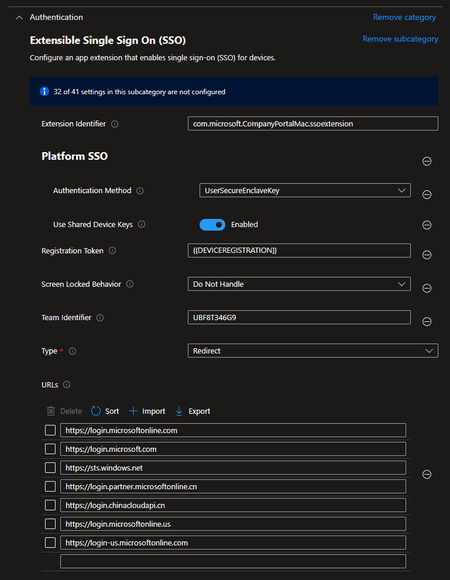
- The current configuration of mine is already screenshoted in this thread, a few posts above yours. I've attached the current settings catalog screenshot again at the end of this post.
- The company portal now gets installed correctly after removing all the app bundle ids except from the main one (Screenshot attached below)(Kudos to Platformer). Currently i don't think this has anything to do with the main issue that PSSO isn't working (But i really don't know why MS doesn't describe the issue with the bundle-IDs in their docs?! Every administrator following the ms docs should have 100% errors in deploying company portal app to macOS)
- The "registration required" PopUp (Screenshot attached below) isn't showing up to complete the process, so: No, PSSO isn't working at all. The only way of logging in to the system is with the one local account with the initial set local password.
Platformer I can recreate the error in your screenshot as you mentioned (Settings \ Passwords \ PW options \. ..). So we're both in the exact same situation. Great, isn't it? 😉
What do you mean with minimum authorization in your entra id? What i can tell regarding my environment: We're using cloud-only identities, no on-premises active directory. I don't think your're having issues with the entra id accounts. Of course you should use entra id connect for example to sync your on-prem identities to azure-ad / entra id so you're working with "one account" and not with two seperate ones for on-prem auth and cloud auth.
RussMeyer-Epik: Thanks for your information. But others than yours, mine (and i think the one from Platformer too) is configured via Apple Business Manager (Automated Device Enrollment).
But: Where are trailing spaces? Every time i copy & paste something i check twice if there are trailing or leading spaces, so i can guarantee, there are no wrong spaces in my configuration.
Current settings catalog for platform sso:
Company Portal Installation:
Missing pop-up "registration required"
