Forum Discussion

TungNguyen1600
Jun 27, 2022Copper Contributor
Google Drive App Install Issue
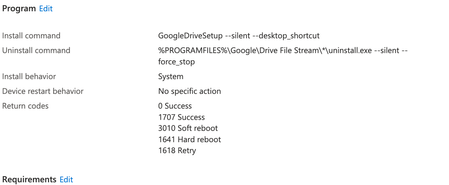
Hi guys, I deploy Google Drive (GD) to all devices, but i am getting a failed status (see below). GD is definitely installing correctly so it must be something to do with my config (see attached)...
- Jun 27, 2022
TungNguyen1600 Are you just checking to that folder or a file in that folder? Perhaps using a registry check is a beter option of a detection.ps1 script? Something like this below:
if (test-path -path 'C:\Program Files\Google\Drive File Stream') {
write-host Google Drive is installed
exit 0
}
else {
write-host Google Drive is not installed
exit 1
}

Jun 27, 2022
If you choose to use a custom detection script, you can select and upload it. I usually keep it in the same directory as the package so that I have all the files together in one directory, I do create the package from that but you will still need to select it from your harddrive from within the detection rule pane and then it will be uploaded

TungNguyen1600
Jun 27, 2022Copper Contributor
Christ, I'm being so dumb, of course. ok i'll try your script and let you know how it goes. thank you!
- Jun 27, 2022Let us know and mark my answer as solution to mark it as solved if it works 🙂
- TungNguyen1600Jun 27, 2022Copper Contributor
Harm_Veenstra You are an absolute star, the script worked! thank you!
I clicked like on the script, how do i mark this as resolved?
- Jun 27, 2022Thank you, no problem and glad to help!