Forum Discussion

Device Compliance
- Mar 18, 2019
Baljit Aujla I have figured out the solution.
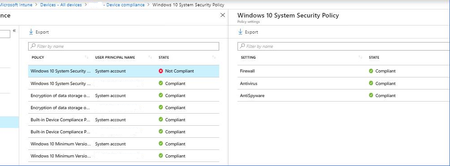
When you have Compliance policy, assigned to All Users, it will reflect all your Azure AD users with those logins. But what about other (local accounts), like "system account" etc.., they are not compliant.
Resolution is to have another additional (same) compliance policy, assigned to Azure AD security group, and add those (shared) windows 10 devices to the group.
In that case, Compliance policy is assigned on device level to the specific device, and then "system account" does not cause the problem.
It is poorly documented, but this is something that Microsoft Support given to me...


AJRoy Did you already tested assigning the bitlocker policy to users?

Hi, just in the throes of testing it now. Although as most of our machines have Bitlocker installed, to properly test it I'll have to remove it and then see what happens. Currently it has succeeded on the two active machines that I'm the primary user on where Bitlocker is installed, so the process looks like it works. No sign of a System A\c but wasn't expecting one. I'll and keep you informed as things progress, remind me if I haven't. Regards.
 John GrebleSep 09, 2020Copper Contributor
Just found the same problem with a BitLocker Configuration Profile. Machine is sitting next to me, and manage-bde says it is 100% encrypted. For my user account, the status of the machines is succeeded however, for the same machine and the System Account it shows error so then the overall status is error. Other machines have the system account and the user account as successful while one other machine just has the user account in error. Other machines do not have any system account status listed. And this is with just 6 machines targeted, 5 different states. 🙂 I am targeting by a device group because I figured machines are encrypted, not people.
-John
- John GrebleAug 28, 2020Copper Contributor
I still see devices showing as non-compliant and when I drill down to see I see User A as compliant for the Built-in Device Compliance Policy and User B non-compliant for the same Built-in Device Compliance Policy and also compliant for another policy. So in a Pandemic world, I have to some how get this PC back to the User B so they can logon to clear the non-compliance they triggered a month or so ago when I enrolled them before I defined any policies? Tell me it is not so.
-John
 RobdeRoosJan 08, 2020Iron Contributor
PatrickF11 I believe it depends on if the policy is targeted to the admin user.
- AJRoyJan 08, 2020Copper Contributor
Hi, good point and I don't know. I'm only following instructions that I haven't completed yet. I'm getting into a real plate spinning exercise where all my attempts to apply some sort of MDM hit some sort of issue, usually in the area of confirming what I've asked is actually done. I spend a lot of my time dealing with MS Intune support, who are very nice, but can't really help when the product is not helping them, in my opinion of course, but it is frustrating.
- PatrickF11Jan 08, 2020MCT
The Admin Account Compliance problem wouldn't be solved when using bitlocker via user and not via computer assignment, isn't it?
- AJRoyJan 08, 2020Copper Contributor
Agreed. However I have just written a longish reply which, when posted, disappeared and I hadn't had the foresight to make a copy just in case! Hugely frustrating as I didn't really commit it to memory and it just goes to show how we lazily rely on everything working properly and not building in contingency when it unexpectedly fails. This is the modern way, as building in fail safes and stress testing is expensive and time consuming, Boeing could well be an example of this, we shall see. Anyway, I digress.
Whilst we are gradually building up the way we use Intune to manage our devices, I am finding it very frustrating. The casual approach to compliance\non-compliance is perplexing. In my particular case I fundamentally only need to know whether Bitlocker is on or off as this is a device centric issue. Getting a non-compliance because of a spurious System A\c is frustrating and cannot be left as a 'false positive' as any auditor would rightly flag it.
The way of managing devices in the modern world is changing especially around the security of data which, in Europe, the GDPR regulations have rightly highlighted. It is difficult enough getting users to modify their mindsets about data without the management systems being a little vague, as fundamentally I want to set up the device to a set of security principles, I want it to be monitored to ensure that it stays that way and I want it to be flagged if somehow it isn't, plus I want sensible error messages if things don't work, is that too much to ask??
With devices that are predominantly off site, reliance on the accuracy of monitoring tools is paramount, and it just doesn't feel that that's in mind.
- RobdeRoosJan 08, 2020Iron Contributor
AJRoy I can imagine this would solve the system account issue because the policy isn't applied to the system account. But what if, on a shared device, 1 user breaks compliance and another user logs on before remediation can me done for that one user? I recon the device would still be marked as non compliant even though the second user is marked as compliant again.
That is the issue I have ran into in the past.
I believe what MS states is not the solution to the issue but a workarround.