Forum Discussion

Device Compliance
- Mar 18, 2019
Baljit Aujla I have figured out the solution.
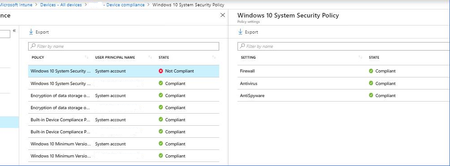
When you have Compliance policy, assigned to All Users, it will reflect all your Azure AD users with those logins. But what about other (local accounts), like "system account" etc.., they are not compliant.
Resolution is to have another additional (same) compliance policy, assigned to Azure AD security group, and add those (shared) windows 10 devices to the group.
In that case, Compliance policy is assigned on device level to the specific device, and then "system account" does not cause the problem.
It is poorly documented, but this is something that Microsoft Support given to me...


Same here - we thought device compliance was the best way to go, since we are cloud only, joined to AzureAD and other users could theoretically log in to other devices even though they hardly ever do that. Win10 is at least v1803 on our machines.
But, like you and a few other posters here mentioned, some devices report complaint with both 'system' and user account, then others are marked non-compliant with either the 'system account' or user account not compliant.
@microsoft:
being that we as system admins have no control over this 'system account', I'd like to request it officially removed from compliance checking, or at least see a check-box in the policy to exclude it. Additionally, if assigning most policies to devices is not the preferred method, update the documentation to include explanations that system admins can understand, then we can make an informed decision as to which way we'd like to go for our organization. Also add some explanation as to what the 'system account' is and how it is controlled/administered/used.

I have had some advice from MS Intune support and they say that in my case (a Bitlocker policy) it should be applied to the User and not the machine to solve the issue. It seems counter intuitive (to me anyway) to apply a policy which really only can apply to machines (it is encrypted or it isn't), to users who aren't going to be encrypted. Anyway, I am going to test this advice and see what happens, but it does feel like a 'fudge'.
If I remember correctly (and I might not), it seems a System A\C is created when the machine is added to the system (Intune?) before the primary user is created. The trouble is this System A\C can either be compliant or not, depending on something as yet unknown. One way to get rid of it is to remove the machine from AAD and re-join it. Simple enough in AD but not so in AAD, and anyway there is the extra gotcha in making sure that you've not named your machine with over 15 characters, which is allowed, (maybe 16, but just to be on the safe side) as it makes the process of creating a local admin that you need to log into when off the domain, impossible. Believe me, I have stumbled into that one which took days and was solved by accident and luck.
Overall I can see the point of Intune, especially if you need to back up your security principles/management of devices with some sort of verifiable evidence. However, every policy is a complex slog and I have now started to create policies with only one or the minimum changes possible to keep things simple. Plus, on advice, I am now testing things that directly and obviously affect the user, one at a time, which makes it an even bigger slog. For example, I'm testing a policy to block access to Defender settings, so no-one can switch them off. One setting, which according to Intune has worked, but on the machine no change. Spotted in the (awful) documentation that for this setting the machine requires a reboot. Rebooted it, no change. So Intune says the policy is successful but the machine has clearly not got the message. Incidentally the 'Disable Autoplay' setting doesn't make any visible changes and the Autoplay button remains 'on' in the Settings panel. You would think this would be fairly easy to test before it is shown the light of day!!
- PatrickF11Jan 08, 2020MCT
AJRoy Did you already tested assigning the bitlocker policy to users?
- AJRoyJan 08, 2020Copper Contributor
Hi, just in the throes of testing it now. Although as most of our machines have Bitlocker installed, to properly test it I'll have to remove it and then see what happens. Currently it has succeeded on the two active machines that I'm the primary user on where Bitlocker is installed, so the process looks like it works. No sign of a System A\c but wasn't expecting one. I'll and keep you informed as things progress, remind me if I haven't. Regards.
 RobdeRoosJan 08, 2020Iron Contributor
AJRoy I can imagine this would solve the system account issue because the policy isn't applied to the system account. But what if, on a shared device, 1 user breaks compliance and another user logs on before remediation can me done for that one user? I recon the device would still be marked as non compliant even though the second user is marked as compliant again.
That is the issue I have ran into in the past.
I believe what MS states is not the solution to the issue but a workarround.
