Forum Discussion

Device Compliance
- Mar 18, 2019
Baljit Aujla I have figured out the solution.
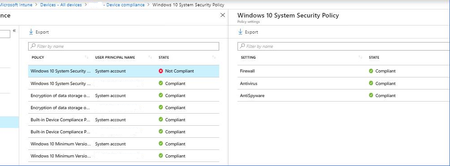
When you have Compliance policy, assigned to All Users, it will reflect all your Azure AD users with those logins. But what about other (local accounts), like "system account" etc.., they are not compliant.
Resolution is to have another additional (same) compliance policy, assigned to Azure AD security group, and add those (shared) windows 10 devices to the group.
In that case, Compliance policy is assigned on device level to the specific device, and then "system account" does not cause the problem.
It is poorly documented, but this is something that Microsoft Support given to me...


In our environment we use device assignment, too. (For device compliance and for device configurations.)
Some of the devices are only showing the compliance and configs for the user, some devices are showing them for user AND system account.
I really have no idea why. Anyone else?
And of course we have the same issues as everyone in here:
Some device configs are compliant for user AND system account, some configs are only compliant for the user.
BUT: When i have a device with user compliance marked as compliant and system account as non compliant, the whole device is marked as compiant in the GUI nevertheless.

Hi, no I can't come up with any ideas either but I just wanted to post my screaming frustration with this scenario, it really is not good enough. We use device policies and fortunately we don't have that many machines, but we have compliance failures for System Accounts that should have no bearing on the situation. We also have situations where the System Account is Ok and the user account isn't! Go figure.