Forum Discussion

PatrickF11
May 24, 2024MCT
Platform SSO for macOS not working
(Update after long troubleshooting: the two main issues until now were:
Leading and/or trailing spaces in the configs > They lead to visible and unvisible errors!
When using in europe you need to re...
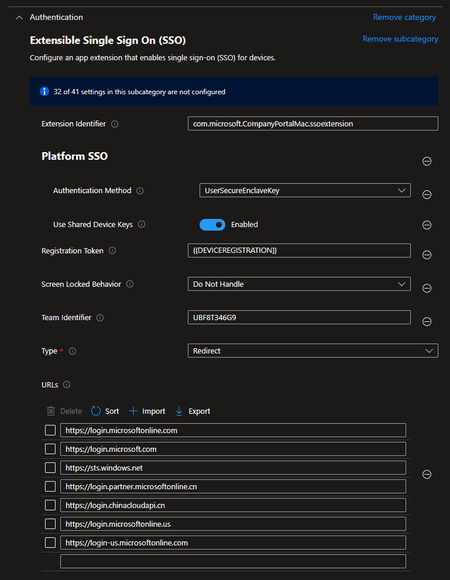

RussMeyer-Epik
Jul 06, 2024Copper Contributor
Kishoth, I just dont get the popup to finish registration...from what I read that is the only way to kick it off...the rest of intune and profile is good...in the intune config profile I have set to password...give me a bit and I can upload the config profile...but since Apple Business Manager is not in the loop, this is manual enrollment via company portal
RussMeyer-Epik
Jul 06, 2024Copper Contributor
Configure an app extension that enables single sign-on (SSO) for devices.
Screen Locked Behavior
Do Not Handle
Registration Token
{{DEVICEREGISTRATION}}
Platform SSO
Authentication Method
Password
Token To User Mapping
Account Name
preferred_username
Full Name
name
Use Shared Device Keys
Enabled
Team Identifier
UBF8T346G9
Extension Identifier
com.microsoft.CompanyPortalMac.ssoextension
Type
Redirect
URLs
https://login.microsoftonline.comhttps://login.microsoft.comhttps://sts.windows.net
- RussMeyer-EpikJul 07, 2024Copper Contributor
ok, so that is what I get for copy/paste...trailing spaces, ugh!!!! got the prompt now and its enrolled...but now to the nuances...while the password syncs and appears ok, getting some prompts for pin/keys...doesnt appear the token is fully there, similar to hello for business...but once past its pretty solid for MS 365 access and SSO apps
 PlatformerJul 08, 2024Copper ContributorI can confirm that with the spaces, I had them in the URLs, but unfortunately it still doesn't work for me. However, I suspect that it is due to the Entra ID I am using. Our accounts are all managed via our local AD, so our Entra IDs are actually only used to log in to Office 365.
And here is my question, what minimum authorizations does my Entra ID need to have in the AAD for the profile installation to work?
Standard user? Admin?
I'm just surprised that I can join AAD with the same account Windows Autopilot devices without any problems.